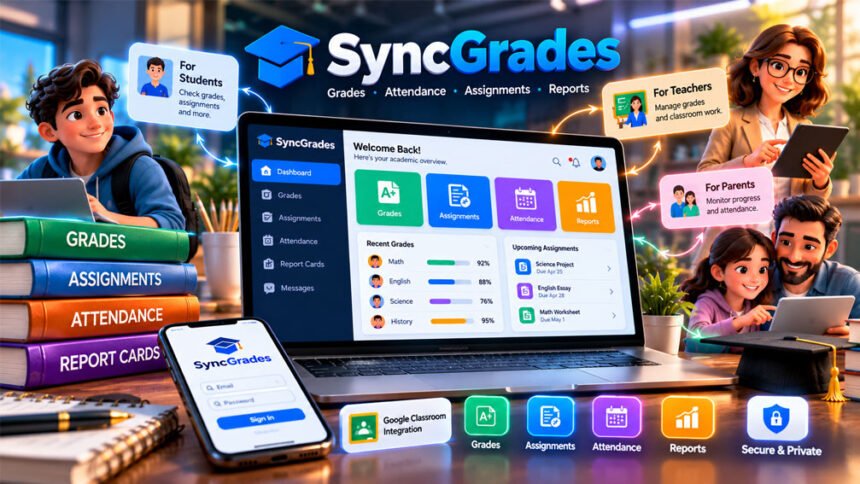
SyncGrades is an education platform for schools. It helps manage grades, assignments, attendance, report cards, and student information.
The platform is mainly focused on New York City schools. Teachers can manage schoolwork and grades, while students and parents can check available school information. SyncGrades also works with Google Classroom.
This guide explains how SyncGrades works, its features, login, mobile apps, pricing, benefits, limitations, privacy, and common problems.
What Is SyncGrades?
SyncGrades is a school management platform developed by Lilo Consulting, LLC. It puts several school tools in one system.
Schools can use it for grades, assignments, attendance, report cards, student progress, and family communication.
The platform is made for teachers, administrators, students, parents, and guardians. It has a strong focus on New York City schools and their grading and reporting needs.
SyncGrades can also connect with Google Classroom. This can reduce the need for teachers to enter the same information in different systems.
However, every school may use SyncGrades differently. Available features depend on the school’s plan, settings, and user permissions.
How Does SyncGrades Work?
SyncGrades connects classroom work with school records.
A school can set up students, teachers, classes, and account permissions. Teachers can then manage assignments, grades, and attendance.
SyncGrades can also connect with Google Classroom and supported school systems. Some information can move between these systems, which may save teachers time.
Teachers and administrators can use the platform to prepare progress reports and report cards.
Students and parents may also see grades, assignments, attendance, schedules, and other information. What they can see depends on what their school allows.
Main SyncGrades Features
SyncGrades has tools for teachers, students, parents, and school administrators.
Gradebook and Assignment Management
The SyncGrades gradebook helps teachers manage student grades.
It supports points, percentages, and weighted grading. Teachers can also use different marking periods and rules such as dropping the lowest score.
These options are useful because different classes may use different grading systems.
Assignments can also work with supported Google Classroom features.
Google Classroom Integration
SyncGrades can connect with Google Classroom.
The connection can include class lists, coursework, assignments, and grades. This may reduce the need for teachers to enter the same information more than once.
However, not everything will always sync automatically. It depends on the school’s setup and permissions.
Schools should also check what information SyncGrades is allowed to access through Google Classroom.
Attendance Tracking
Schools can use SyncGrades to record attendance.
It supports daily attendance and attendance for individual class periods. Schools can record students as present, absent, late, or under another supported status.
SyncGrades also offers attendance alerts. Depending on school settings, parents may receive alerts through email, SMS, or mobile notifications.
Report Cards and Progress Reports
SyncGrades includes tools for report cards and progress reports.
Teachers can enter grades and prepare reports. Administrators can also check for missing grades before reports are sent.
The platform supports PDF report cards and CSV exports.
These tools can make school reporting easier to manage.
Parent and Student Access
Students and parents may be able to view school information through SyncGrades.
Depending on the school, this can include:
- Grades and assignments
- Attendance
- Class schedules
- Academic progress
- Report cards
- School notifications
The school controls what each user can see.
Parents also need to make sure their account is connected to the correct child.
School Analytics and Student Support
SyncGrades has analytics tools for school administrators.
These can include school dashboards, report card analysis, assignment analysis, exam analysis, and student groups.
For example, staff may use these tools to find students who often miss assignments or need more help in a subject.
Analytics can show useful patterns, but teachers still need to understand why a student may be having problems.
Paper Assessments
SyncGrades also has tools for paper tests.
Schools can create bubble sheets and process scanned answers. Supported test results can then be added to the gradebook.
This may save time when schools use both paper tests and digital gradebooks.
SyncBucks
SyncBucks is a student reward feature.
Schools can create rules that allow students to earn virtual rewards. Students can save these rewards in a virtual wallet and use them in a school-managed store.
SyncBucks may not be available with every plan. Schools should check whether it is included.
SyncGrades Login
The SyncGrades login process can be different for each school and user.
Students, teachers, parents, and administrators may use different sign-in methods.
Users should always use the official login method given by their school. Some schools may support Google sign-in or an NYC DOE-related login.
Never share your password or verification code with unofficial support services.
Student Login
Students usually receive their account through their school.
Some students may sign in with a school email or Google account. NYC students may also have a school-supported DOE login option.
After signing in, students may see grades, assignments, attendance, schedules, and other school information.
Students who cannot access their accounts should contact their school or IT staff.
Parent Login
Parents may receive an invitation from their child’s school.
They can follow the instructions in the email to set up their account or password.
Once the account is connected correctly, parents may be able to check grades, assignments, attendance, reports, and notifications.
If the wrong child appears or a child is missing, parents should contact the school.
SyncGrades App for Android and iPhone
SyncGrades has mobile apps for Android and Apple devices. The developer is listed as Lilo Consulting, LLC.
Users may be able to check grades, assignments, attendance, schedules, and notifications through the app.
The collected information lists iOS 15 or later for iPhone and iPadOS 15 or later for iPad.
Android users should check Google Play for current device requirements.
Always check the developer name before installing the app.
The mobile app may not have every feature found on the web version. If something is missing, check the website or ask your school.
SyncGrades Pricing and Plans
SyncGrades uses annual pricing for schools.
The price can depend on the plan and number of students. A standard public price list was not available in the information reviewed.
Schools need to contact SyncGrades for a quote.
Teacher Suite
The Teacher Suite focuses on classroom work.
It includes grades, assignments, attendance, report cards, and Google Classroom integration.
School Suite
The School Suite adds more tools for students and families.
It includes Teacher Suite features along with parent access, messaging, mobile access, and notifications.
Success Suite
The Success Suite focuses on school performance and analytics.
It includes dashboards, performance analysis, exam analysis, student groups, and tools that can help schools plan student support.
Optional Features
SyncGrades also offers some optional features.
These can include SyncBucks, attendance alerts, SMS messages, and target groups.
Schools should ask which features are included in their plan and whether any cost extra.
Is SyncGrades Free?
The full SyncGrades platform is not simply a free service.
The mobile apps may be free to download. Its Google Workspace integration may also be listed as free. However, schools still pay for the main SyncGrades service.
One source says parents can use their accounts without paying because the school or district pays for the service. The exact arrangement can depend on the school.
Schools should request a full quote before choosing a plan.
SyncGrades Benefits
SyncGrades puts several school tools in one place.
Its Google Classroom connection may reduce repeated work for teachers. Teachers can also use different grading methods and manage attendance and reports.
Students can follow their grades, assignments, schedules, and progress when these features are enabled.
Parents may be able to check grades, attendance, reports, and school notifications.
Administrators can use reports and analytics to understand student performance and find students who may need extra support.
SyncGrades may be especially useful for NYC schools because many of its tools are designed around their needs.
SyncGrades Limitations
SyncGrades does not work exactly the same way at every school.
Available features depend on the school’s plan and settings. User permissions can also change what teachers, students, and parents can see.
Google Classroom syncing may not always be fully automatic. Some tasks may still need to be completed by teachers.
Schools outside New York City should check whether SyncGrades works with their local systems and rules.
The mobile app and website may also have different features.
Some public app reviews mention login, navigation, speed, and access problems. These are individual user reports and do not mean everyone has the same problems.
Another limitation is pricing. Schools need to request a quote because there is no simple public price list in the information reviewed.
SyncGrades Privacy and Security
SyncGrades can handle important student information, so privacy and security matter.
This information may include names, grades, assignments, attendance, academic progress, and family details.
Schools should check who can access this information and what permissions each user receives.
Google Classroom connections can also require access to classroom information. Schools should review these permissions carefully.
One collected source says SyncGrades follows FERPA and New York State education privacy rules and does not sell student data to third parties. Schools should check the latest official privacy and legal documents before relying on these claims.
Schools should also understand how student information is stored, shared, kept, and deleted.
Does the SyncGrades App Collect Data?
The Apple App Store says the developer reports that the SyncGrades app does not collect data.
However, Apple says this information comes from the developer and is not verified by Apple.
This also does not mean the entire SyncGrades service uses no personal information.
The mobile app, website, school systems, and Google Classroom connection may handle information in different ways. Users should check the latest privacy policy for more details.
Common SyncGrades Problems and Fixes
Some users may have problems with login, Google Classroom syncing, mobile apps, or missing features.
SyncGrades Login Not Working
First, check that you are using the correct account and login page.
Check your username and password. If you use Google sign-in, make sure you selected the correct Google account.
Parents can use the official password reset option when available. Students may need help from their school or IT staff.
You can also try an updated browser or private browsing window.
“Sync Grades” Button Is Missing
Refresh the page first.
If the button is still missing, clear your browser cache. You can also check whether an extension or ad blocker is causing the problem.
If this does not help, contact the school administrator. Your account may not have the correct permissions.
Google Classroom Is Not Syncing
Check that the correct Google account is connected.
Also check that the required permissions are enabled.
Some syncing problems may be caused by the school’s settings. Contact the school administrator if assignments or grades are still missing.
SyncGrades App Is Not Working
Check your internet connection and update the app.
You can also restart the app or your device. Signing out and signing back in may help with some problems.
If the problem continues, reinstall the official app from Google Play or the Apple App Store.
SyncGrades May Be Down
Try opening SyncGrades in another browser or on another device.
Ask another student or teacher if they are having the same problem.
If many users cannot access the service, there may be a wider problem or maintenance. Contact the school for more information.
SyncGrades vs Other School Management Tools
There are other education platforms that schools can compare with SyncGrades.
Google Classroom
Google Classroom mainly focuses on classroom work.
Teachers can create assignments, share learning materials, collect work, give feedback, and manage coursework.
SyncGrades focuses more on connecting classroom information with grades, attendance, reports, and other school records.
The two platforms can also work together.
PowerSchool
PowerSchool is a student information and school administration platform.
Schools can use it for student records, attendance, grades, schedules, reports, and other administrative work.
Schools comparing it with SyncGrades should consider their current systems, required features, integrations, and costs.
Infinite Campus
Infinite Campus is another student information system.
It provides tools for areas such as attendance, grades, student records, schedules, and family access.
Schools should compare these platforms based on the features and integrations they actually need.
Who Should Use SyncGrades?
SyncGrades can be useful for schools that want to manage grades, attendance, reporting, and classroom information in connected workflows.
Teachers can use it for grades, assignments, attendance, and reports.
Administrators can use reporting and analytics tools to review school performance.
Students can check available grades, assignments, schedules, and progress. Parents can follow information about their children when parent access is enabled.
SyncGrades may be especially useful for NYC schools.
Schools outside NYC should first check whether the platform works with their local systems and requirements.
Bottom Line
SyncGrades is a school management platform developed by Lilo Consulting, LLC.
It provides tools for grades, assignments, attendance, report cards, family access, and student performance. It also works with Google Classroom and offers mobile apps.
The platform has a strong focus on New York City schools. However, available features depend on the school’s plan and setup.
Schools should check pricing, features, privacy, integrations, support, and compatibility before choosing SyncGrades.
Frequently Asked Questions
What is SyncGrades used for?
SyncGrades helps schools manage grades, assignments, attendance, and report cards. Students and parents can also check school information.
Does SyncGrades work with Google Classroom?
Yes. SyncGrades can connect with Google Classroom to help manage assignments and grades.
How do I log in to SyncGrades?
Use the login details given by your school. You may sign in with your school account, Google account, or another supported method.
Is SyncGrades free?
The app may be free to download, but schools pay for the full SyncGrades service. The price depends on the school’s plan.
Is there a SyncGrades app for Android and iPhone?
Yes. SyncGrades has apps for Android, iPhone, and iPad. Always install the official app.
Is SyncGrades safe?
SyncGrades is an education platform that handles student information. Schools should still check its privacy and security settings.
Why is SyncGrades not working?
It may be caused by wrong login details, browser problems, permissions, or a service issue. Contact your school if the problem continues.
Can parents see student grades on SyncGrades?
Yes, if the school allows parent access. The parent’s account must also be linked to the correct student.
More To Explore:
Tikcotech Review: Features, Benefits, Limitations, and Safety