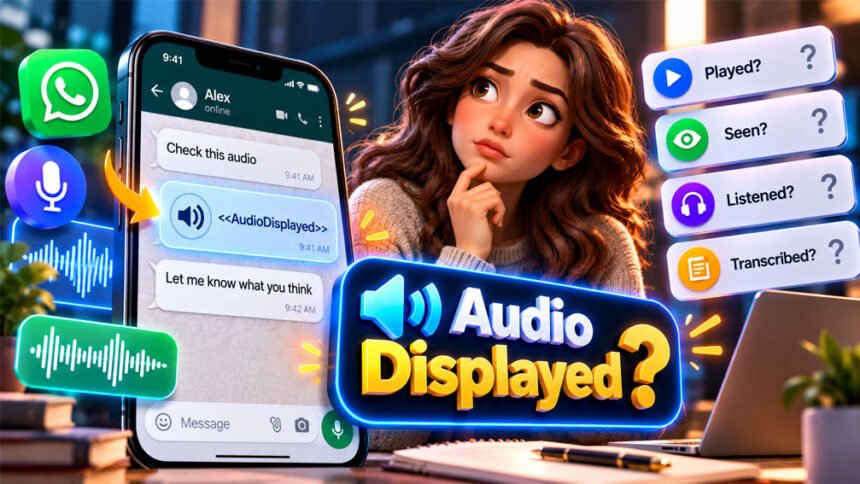
Audiodisplayed is a term you may see in chats, transcripts, exported conversations, or technical text. It usually means an audio item was shown or represented by a digital system.
People often search for the Audiodisplayed meaning because they want to know if someone played or listened to their audio. It can also be confusing when it appears as <<AudioDisplayed>> in a transcript.
This article explains what Audiodisplayed means, where you may see it, and how it is different from played, listened, and transcribed audio.
What Does Audiodisplayed Mean?
Audiodisplayed combines two words: audio and displayed.
Audio means sound content. It can be speech, music, a voice message, a recording, or another type of sound.
Displayed means something was shown or presented.
In simple words, Audiodisplayed can mean:
“An audio item was shown or represented here.”
The audio item could be a voice message, recording, sound clip, audio player, attachment, or transcript marker.
However, the term does not tell you exactly what happened to the audio. It does not automatically mean someone played or listened to it.
The exact meaning depends on the app, website, transcript, or software where you see it.
Is Audiodisplayed a Real Word?
Audiodisplayed is not a common word in normal English.
Usually, “audio displayed” would be written as two words. For example, someone may say, “The audio player was displayed.”
Software often joins words together for labels, variables, and other technical names. This can create different forms, such as:
AudioDisplayedaudioDisplayedaudiodisplayedaudio_displayedaudio-displayed<<AudioDisplayed>>
These forms look similar, but they may not always mean the same thing. Different apps or developers can use them in different ways.
Is Audiodisplayed Slang or an Abbreviation?
No. Audiodisplayed is not common texting slang.
It is different from abbreviations such as LOL, BRB, and IDK. There is also no confirmed full form for Audiodisplayed.
It looks more like a technical label made by joining “audio” and “displayed.”
There is also no known hidden, romantic, rude, or offensive meaning. Its meaning depends on where and how it appears.
What Does <<AudioDisplayed>> Mean?
<<AudioDisplayed>> often looks like a marker or placeholder.
Online conversations can contain text, images, videos, voice notes, and other media. When a conversation is changed into a text-only format, the audio may not appear in its original form.
Instead, a marker may show where the audio was.
For example:
Alex: Listen to this recording.
Alex: <<AudioDisplayed>>
Sam: I will check it later.
Here, <<AudioDisplayed>> shows where an audio item appeared. It is not the actual recording.
It also does not tell you what Alex said in the audio. You cannot know from the marker if Sam played or listened to it.
This is only an example. It does not mean every messaging app uses <<AudioDisplayed>> in this exact way.
If you see this marker in a real conversation, check the original app or the tool that created the transcript.
Audiodisplayed Meaning in Text and Chats
In a text or chat, Audiodisplayed may show that there was an audio item at that point in the conversation.
It could represent a voice note, recording, sound clip, audio player, attachment, or system marker.
The messages around it can help you understand what it means.
For example, someone may write, “Listen to the sound my car is making,” followed by AudioDisplayed. In this case, the marker probably represents the recording they mentioned.
However, you still cannot know what is inside the recording unless you can open or transcribe it.
Audiodisplayed should not automatically be treated as a status like seen, read, or played. Only do this if the specific app clearly defines it that way.
Audiodisplayed in Audio Transcripts
Audiodisplayed may also appear in a transcript.
A transcript usually turns spoken or recorded information into written text. However, some audio files may not be converted into words.
In this case, the system may use an AudioDisplayed marker to show that audio existed at that point.
This can happen for different reasons. The original conversation may contain a voice message that was not transcribed. The export may leave out the audio file. A third-party tool may also add its own marker.
For example:
John: Are you free later?
<<AudioDisplayed>>
Mary: Yes, I will call you after work.
The marker shows that an audio item may have appeared between the messages. It does not show what was said in that audio.
It is similar to seeing [Image omitted] in a document. You know an image was there, but you cannot see what the image contained.
AudioDisplayed vs Audio Transcription
An audio placeholder and an audio transcription are different.
A transcription changes spoken words into written text.
For example, a person says:
“I’ll call you tomorrow.”
A transcription may show:
I’ll call you tomorrow.
A placeholder may only show:
<<AudioDisplayed>>
The transcription tells you what the person said.
The placeholder only shows that an audio item was there. It does not tell you what was said.
If you only see AudioDisplayed, you need the original recording or a real transcription to know what the audio contains.
Audiodisplayed in Exported Chats
Messaging apps can contain text, photos, videos, documents, stickers, voice notes, and other files.
When a conversation is exported as text, some of these items may not appear in their original form.
The exported file may use a simple marker instead. The actual media files may also be saved separately.
This helps keep the messages in the correct order, even if the audio or other media is missing from the text file.
If you see Audiodisplayed in an exported chat, check how the chat was exported. Also check whether media files were included.
Audiodisplayed Meaning on WhatsApp
Some third-party sources connect <<AudioDisplayed>> with voice messages in exported or processed WhatsApp chats.
However, there is not enough reliable information to say that Audiodisplayed is an official WhatsApp status used everywhere.
If you see AudioDisplayed in a WhatsApp transcript, it may represent a voice note or other audio item.
The marker could also have been added by another tool. This could be a transcription service, AI tool, conversion tool, or another program that processed the chat.
This is different from a normal WhatsApp voice note. In WhatsApp, a voice note has its own audio player and controls.
So, seeing Audiodisplayed in a WhatsApp-related transcript does not prove that someone played or listened to the voice message.
Audiodisplayed and ChatGPT or AI Transcripts
Audio can also be used in AI tools and transcription systems.
Voice conversations, recordings, dictation, speech-to-text, transcripts, and audio placeholders are different things.
For example, dictation records your voice and changes your spoken words into text. Speech-to-text tools work in a similar way.
An AudioDisplayed marker may simply show that audio was present without showing what was said.
There is not enough reliable information to call AudioDisplayed an official ChatGPT status meaning listened, heard, read, or completed.
The same rule applies to other AI transcripts. Seeing AudioDisplayed does not tell you which tool created the marker or exactly what happened to the audio.
Check the app or service that created the transcript if you need its exact meaning.
Does Audiodisplayed Mean Someone Listened?
No. Audiodisplayed does not prove that someone listened to an audio message.
An audio player can appear on a screen without anyone pressing play. A transcript can also show an audio marker even if nobody played the recording.
Even if the audio starts playing, this does not always prove that someone listened to the full recording. They may stop it early or have their device muted.
If you want to know whether someone listened to your voice message, check the playback information provided by the app.
Do not use AudioDisplayed alone as proof.
Audiodisplayed vs Played, Seen, and Listened
These words can describe different actions.
| Term | Easy Meaning |
|---|---|
| Displayed | The audio was shown or represented |
| Delivered | The content reached the other person |
| Available | The audio can be opened |
| Seen | The message or chat was viewed |
| Opened | The item was opened |
| Played | The audio started playing |
| Completed | The audio played to the end |
| Listened | A person actually heard the audio |
| Transcribed | The spoken audio was changed into text |
The most important difference is between displayed and played.
Displayed means the audio appeared. Played means the audio started playing.
Seen is also different. Someone can open a chat and see a voice message without playing it.
Different apps may use these terms in different ways. Always check how the specific app defines its message and audio statuses.
Is Audiodisplayed a Programming Term?
AudioDisplayed can look like a programming term.
Developers often join words when naming things in software.
For example:
audioDisplayed
audio_displayed
A developer could also write:
audioDisplayed = true
This could mean that an audio player has appeared on the screen.
However, AudioDisplayed is not a standard programming keyword. It does not have one meaning across all programming languages or apps.
A developer can decide what audioDisplayed means inside their own software.
If you see the term in code, an API, a technical log, or developer tools, check the code or official documentation to understand its meaning.
Audiodisplayed vs Audio Description
Audiodisplayed and audio description are not the same thing.
Audio description is an accessibility feature. It uses spoken words to explain important visual details in movies, TV shows, videos, and other visual content.
For example, audio description may explain when a person enters a room, picks up an object, reads a sign, or changes their facial expression.
This can help people who are blind or have low vision understand what is happening on the screen.
Audiodisplayed does not have this meaning. It is usually a label connected to an audio item being shown or represented.
If you see an audio option in the accessibility settings of a TV, phone, streaming service, or media player, check its exact name. It may be Audio Description, Descriptive Audio, Spoken Content, or another accessibility feature.
What Audiodisplayed Does Not Tell You
Audiodisplayed gives very little information by itself.
The term alone does not prove that:
- Someone listened to the audio.
- Someone played the audio.
- The audio played to the end.
- Someone downloaded the audio.
- Someone saved it.
- Someone ignored it.
- The message was read.
- The recording was deleted.
- A microphone was turned on.
- The audio was transcribed.
- The original recording is still available.
You need other information to confirm these actions.
For example, if you want to know whether someone played a voice note, check the original app for a playback indicator.
Why Is the Original Audio Missing?
Sometimes you may see AudioDisplayed in a transcript but cannot find or open the original recording.
This does not always mean the audio was deleted.
The audio may have been left out when the conversation was exported. It may also have been saved in a separate folder or file.
The recording could still exist in the original app even if it is missing from the transcript.
Other possible reasons include a missing attachment, incomplete export, damaged file, access problem, or a third-party tool that kept only the AudioDisplayed marker.
For example, a tool may turn a conversation into a text document. It may show AudioDisplayed where a voice note appeared but leave the actual recording out.
The marker alone cannot tell you why the audio is missing.
How to Find Out What Audiodisplayed Means
The best way to understand Audiodisplayed is to look at its context.
First, check where you found it.
If it appears in a chat, read the messages before and after it. They may explain what the audio was about.
If it appears in an exported conversation, check whether the export included media files.
You can also look for timestamps, filenames, attachments, or other media information.
If possible, open the original conversation and check whether a voice message or audio file appears in the same place.
If you find AudioDisplayed in code or technical information, check the software documentation.
A simple process is:
- Check where AudioDisplayed appears.
- Read the text around it.
- Check the original conversation.
- Look for the original audio file.
- Check timestamps and filenames.
- Find out how the chat was exported.
- Check whether another tool processed it.
- Read the app or software documentation.
- Check for a real playback status if you want to know whether someone listened.
Context will usually tell you more than the word Audiodisplayed itself.
Should You Use “Audiodisplayed” Yourself?
In normal writing, it is better to use clearer words.
Instead of Audiodisplayed, you can say:
“The audio player appeared.”
If a recording was attached:
“An audio recording was attached.”
If someone played the recording:
“The audio was played.”
If spoken words were changed into text:
“The audio was transcribed.”
For an exported conversation:
“The transcript contains an audio placeholder.”
These sentences make the meaning much clearer.
However, developers may still use audioDisplayed as a variable, field, or event name in software. In this case, its meaning should be clearly explained in the documentation.
Audiodisplayed itself is not known to have any rude or offensive meaning.
Bottom Line
Audiodisplayed usually means that an audio item was shown, identified, or represented in a digital system.
<<AudioDisplayed>> may appear in a transcript to show where an audio item was located in the original conversation.
However, Audiodisplayed does not have one official meaning across every app or service. It is also not common texting slang.
Most importantly, displayed does not mean played or listened to.
If you need to know exactly what happened to an audio message, check the original app, audio file, transcript, or software documentation.
Frequently Asked Questions
What does Audiodisplayed mean?
Audiodisplayed usually means an audio item was shown or represented in a chat, transcript, or digital system.
What does <<AudioDisplayed>> mean in a transcript?
It usually shows where an audio item appeared. It does not show what was said in the audio.
Does Audiodisplayed mean someone listened to my voice message?
No. Audiodisplayed does not prove that someone played or listened to your voice message.
Is Audiodisplayed an official WhatsApp status?
No confirmed information shows it is an official WhatsApp status. It may appear in exported or processed chats.
Is Audiodisplayed the same as audio played?
No. Displayed means the audio was shown, while played means the audio started playing.
Does Audiodisplayed mean the recording was deleted?
No. The audio may still be available in the original app or stored separately.
Is Audiodisplayed the same as audio description?
No. Audio description explains visual content with spoken words. Audiodisplayed has a different meaning.
Is AudioDisplayed a programming term?
It can be used as a name in software code, but it is not a standard programming term.
More To Explore:
FeedBuzzard Com Review 2026: What It Is, Content, Privacy, and Safety