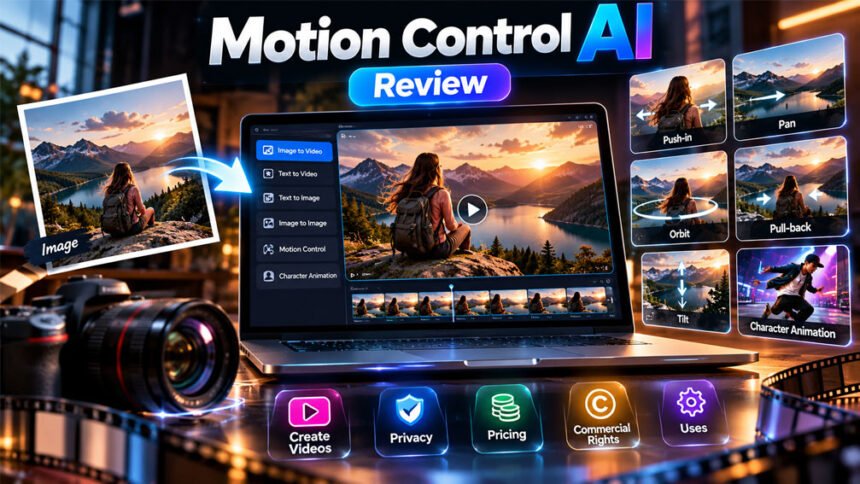
Motion Control AI is an online tool that uses AI to create images and videos. It can turn still pictures into moving videos and create different camera movements.
It may help social media creators, photographers, marketers, and small businesses make videos without expensive cameras or advanced editing skills.
In this review, we will explain its features, uses, prices, privacy policy, and commercial rights. We will also cover its benefits, drawbacks, and alternatives.
What Is Motion Control AI?
Motion Control AI is an online tool for creating images and videos with artificial intelligence. It can turn a still picture into a moving clip or create a video from a written prompt.
For example, you can upload a portrait and create a video that makes the camera appear to move closer to the person. You can also animate a product picture to create a moving product showcase.
The platform offers other tools, such as text-to-video, text-to-image, and image-to-image generation. Some tools also support reference images or videos.
You do not need a physical camera rig to create AI-generated camera movements. The software creates the movement in the video.
However, AI videos are not the same as real recordings. The AI creates new frames, so faces, objects, and backgrounds may change during the process.
The term motion control AI is also used for other technologies in animation and robotics. This review focuses on the website motion-control-ai.net.
How Does Motion Control AI Work?
Motion Control AI uses AI models to create images and videos from pictures, text, and movement instructions.
The usual process is simple:
- Upload an image or enter a text prompt.
- Choose an available image or video tool.
- Select a model and describe the result you want.
- Generate the video.
- Watch the result and check its quality.
- Download the video if your plan allows it.
For example, you can upload a mountain picture and ask the AI to create a slow camera movement across the scene. The tool then creates new frames to make the picture look like a video.
Some tools can also use a reference video to guide a person’s or character’s movement.
The results depend on the image, instructions, and selected model. The AI may not follow every instruction correctly, so it is important to check the finished video.
Main Features of Motion Control AI
Motion Control AI offers several tools for creating and changing visual content. The available features may depend on the model and plan.
Image-to-Video
Image-to-video turns a still picture into a moving clip.
You can upload a portrait, travel photo, or product image and ask the AI to add movement. This can help you create short videos for social media, advertisements, and product pages.
However, the AI may change some details while creating the video.
Text-to-Video
Text-to-video creates a video from written instructions.
For example, you can describe a person walking through a park or a camera moving slowly around a product.
The AI uses your description to create the scene. Clear instructions can help, but the final video may not match your prompt exactly.
Text-to-Image
Text-to-image creates pictures from written descriptions.
You can describe the subject, background, and style you want. The AI then creates an image based on your instructions.
You can use the image on its own or as a starting point for video creation.
Image-to-Image
Image-to-image uses an existing picture to create or change another image.
For example, you may want to try a different visual style or change parts of a picture while keeping the main subject.
The final image may look different from the original, so check the result carefully.
Camera Movement Controls
Motion control tools can create the effect of a moving camera without using physical camera equipment.
The supplied review describes several types of movement. Their availability may vary.
- Push-in: Makes the camera appear to move closer to the subject.
- Pull-back: Makes the camera appear to move away from the subject.
- Pan: Moves the view left or right.
- Tilt: Moves the view up or down.
- Orbit: Creates the effect of moving around a subject.
- Custom movement: Combines different directions when supported.
These movements help change how a scene looks. A push-in can focus attention on a person or object, while a pull-back can show more of the surroundings.
The results depend on the image and AI model. A generated orbit may not look exactly like a real camera moving around an object.
Character Animation and Motion Transfer
Motion transfer uses movement from a reference video to guide another image or character.
For example, you can provide a character picture and a video of someone dancing. A supported tool can use the dance video to help animate the character.
This can be useful for short animations and social media content.
However, the AI may not copy every movement correctly. Faces, hands, clothes, and body positions can change. Always check the result before sharing it.
If you use another person’s image or video, make sure you have permission to use it.
First-Frame and Last-Frame Video
Some AI video tools let you provide an image for the beginning of a video and another for the ending.
The AI creates the frames between these two images. This can help you control how the scene changes.
For example, you could use one image showing a close-up of a product and another showing the product from farther away.
The final video may still contain unwanted changes, so review it before using it.
AI Models and Video Downloads
The platform lists several AI models and tools, including Kling, Veo, Seedance, LTX, Nano Banana, and GPT Image 2. Their availability may change.
Different models can produce different results. Their speed, features, video limits, and credit costs may also vary.
The website also advertises video downloads without watermarks under its stated plan terms. Check your plan to see which models and download options are included.
How to Use Motion Control AI
You can use Motion Control AI through a web browser. The exact steps depend on the tool you choose.
- Open the Motion Control AI website.
- Create an account if required.
- Choose an image or video tool.
- Upload a picture or enter a text prompt.
- Select a model and describe the movement.
- Generate and watch the video.
- Download the result if your plan allows it.
For better results, start with a clear image and simple instructions. For example, ask for a slow camera movement toward a product or a gentle pan across a landscape.
Avoid adding too many movements to your first prompt. Try one movement at a time to see what works best.
The website may change its tools and layout, so follow the options shown in your account.
What Can You Create With Motion Control AI?
Motion Control AI can help create different types of videos and visual content.
Social media videos: Turn photos into short clips for TikTok, Instagram Reels, and YouTube Shorts. Moving visuals may attract attention, but they do not guarantee more views.
Product videos: Create moving product clips for online shops and advertisements without filming every shot.
Marketing content: Make promotional videos for ads, websites, and social media campaigns.
Animated photos: Add movement to portraits, travel pictures, and other still images.
Character animations: Use supported motion-transfer tools to guide a character’s movements.
Video ideas: Test camera movements and visual ideas before making a final video.
These uses can save time in some projects. However, you may still need to edit the video, add music, or include captions before publishing it.
Who Should Use Motion Control AI?
Motion Control AI may be useful for people who want to create videos without filming every scene.
Social media creators can turn photos into short clips. Photographers can add movement to their pictures, while small business owners can create product videos.
Marketers can use it to test promotional ideas. Hobbyists can also use it for personal projects and creative experiments.
However, the tool may not suit projects that need exact camera movements or complete control over every frame. Professional editors and animation teams may prefer software with more detailed editing tools.
The right choice depends on your budget, project, and the level of control you need.
Motion Control AI Pricing and Plans
Motion Control AI uses credits for image and video generation. The website listed three main monthly plans during research. Prices and features may change, so check the official pricing page before paying.
Monthly Plans
| Plan | Monthly price | Monthly credits |
|---|---|---|
| Basic | $15.90 | 1,200 |
| Pro | $29.90 | 3,000 |
| Max | $69.90 | 8,000 |
The Basic plan may suit people who create videos occasionally. Pro provides more credits for regular use, while Max offers a larger monthly allowance.
However, a higher credit allowance does not mean every video costs the same amount. The cost depends on the model and settings.
Annual Plans
The website also listed these yearly prices during research.
| Plan | Annual price | Monthly credits |
|---|---|---|
| Basic | $133.20 | 1,200 |
| Pro | $250.80 | 3,000 |
| Max | $586.80 | 8,000 |
Yearly billing can cost less than paying month by month.
For example, the listed Basic monthly price adds up to $190.80 over 12 months. The yearly price is $133.20, which is $57.60 less before taxes or other charges.
However, yearly plans require a longer commitment. Check the cancellation and renewal rules before subscribing.
How the Credit System Works
Credits are used to create images and videos. Different models and settings may use different amounts.
Video length, resolution, and generation method can affect the cost. Creating many versions can also use credits quickly.
The website provides some estimates of how many images or videos a plan may create. These are examples, not guaranteed amounts.
Check the credit cost before generating a video so you know how much of your allowance it may use.
Is Motion Control AI Free?
The website has advertised signup credits that allow new users to try the service. The amount and availability may change.
These credits do not mean that the platform offers unlimited free video creation. Once your credits run out, you may need a paid plan or other available credits.
If you want to test the tool, check the current free offer first. Start with a small project to see whether the results meet your needs.
What Do Paid Plans Include?
The website advertises image and video tools, monthly credits, customer support, commercial-use rights, and watermark-free downloads under its paid-plan terms.
The exact benefits may depend on the plan and model. Check the current pricing page to confirm what is included before subscribing.
The prices in this review come from the information collected during research. They may not match the latest offers.
Motion Control AI Privacy and Data Handling
Privacy matters when using AI tools because you may upload personal photos, videos, or business files.
Motion Control AI states that uploaded content is processed to create results and automatically deleted within 24 hours. The website also says that it does not use uploaded content to train its models or sell or share that content.
These are claims made by the platform. They have not been independently verified for this review.
Before uploading files, read the current privacy policy. Check how the service handles uploaded content, generated videos, account details, and other data.
Be careful with family photos, private videos, client work, and images that are not yet public. If an image shows another person, consider whether you have permission to upload and animate it.
Do not assume that automatic deletion makes a service suitable for confidential work. Review the terms and only upload content you are comfortable sharing with the service.
Is Motion Control AI Safe to Use?
You can use Motion Control AI for creative projects, but you should take care when uploading images and videos.
Only upload content you own or have permission to use. If you want to animate another person’s face or body, consider their consent, especially if you plan to publish the result.
Check every video before sharing it. AI may change faces, hands, clothes, and backgrounds. This can make a video look like a real recording when it is not.
Protect your account and avoid adding private details to prompts or uploaded files.
The information collected for this review does not confirm whether Motion Control AI has passed independent security checks. Therefore, it would not be accurate to say that the service is completely secure.
If you plan to use it for private or business projects, read the latest privacy policy and terms before uploading your files.
Motion Control AI Commercial Rights and Copyright
The website advertises commercial-use rights for generated content under its paid plans. This may allow users to use eligible videos in advertisements, product pages, social media campaigns, and client projects.
However, permission from the platform does not automatically give you the right to use everything in a video.
For example, you may need permission to use a photograph taken by someone else. A video may also contain a person’s face, a company logo, copyrighted music, or other protected material.
Before using a video for business, check:
- Whether your plan includes commercial-use rights.
- Whether the selected AI model has extra rules.
- Whether you have permission to use your source images and videos.
- Whether the final video contains protected logos, music, or other material.
- Whether copyright and privacy laws apply to your project.
Rules can vary by country and situation. If you are unsure about the rights for a major campaign, consider getting legal advice.
Benefits of Motion Control AI
Motion Control AI has several possible benefits for people who create visual content.
Easy to use: You can start with a picture or text prompt instead of filming every scene.
Less equipment needed: AI can create some camera movements without a physical camera rig.
Quick testing: You can try different movements without setting up a new camera shot each time.
Several tools: The platform offers different ways to create images and videos.
Useful for marketing: You can make product clips, promotional visuals, and social media content.
Possible cost savings: For some projects, AI video can reduce the need for filming equipment and production work.
These benefits depend on the project. Complex videos may still require professional filming, editing, or animation.
Limitations and Drawbacks
Motion Control AI also has some drawbacks to consider.
Results can vary: The video may not follow your instructions exactly.
Visual errors can happen: Faces, hands, clothes, and backgrounds may change between frames.
Limited control: You may not get the exact camera movement or timing you want.
Credit limits: Trying many versions can use credits quickly.
Generation speed varies: Processing time depends on the model, settings, and service demand. Fast results reported by one user are not guaranteed for everyone.
Extra editing may be needed: You may need to trim the video, add music, or include captions.
Privacy needs attention: Check the data policy before uploading personal or confidential files.
The tool may work well for simple creative projects. However, projects that need exact movements and consistent details may require more advanced editing tools.
Common Problems and Troubleshooting
The Video Does Not Follow the Prompt
Your instructions may be too broad or contain too many actions.
Describe one main movement at a time. For example, ask for a slow push-in instead of combining several camera movements in one prompt.
The Subject Looks Distorted
The AI may struggle with unclear images or subjects that are partly hidden.
Try a sharper image where the main subject is easy to see. Generate another version and check the face, hands, body, and background.
Generation Takes Too Long
Video processing time can vary.
Check your internet connection and the generation status. If the tool shows an error, follow its instructions or contact support.
The Result Looks Different From the Original Image
AI creates new frames, so some details may change during generation.
Try another source image, use simpler instructions, or choose a different available model. Check the result before using it in a final project.
Credits Are Used Unexpectedly
Check your generation history and the current credit rules to see how your credits were used.
If a failed generation appears to have charged you incorrectly, contact support and provide the details.
These are general tips for AI video tools. They are not confirmed reports of specific problems with Motion Control AI.
Tips for Getting Better Results
Follow these simple tips to improve your results and avoid wasting credits.
- Use a clear image. Choose a picture where the main subject is easy to see.
- Keep prompts simple. Start with one movement or action.
- Try different versions. Compare the results before choosing one.
- Check the details. Look for changes to faces, hands, clothes, and objects.
- Watch your credit use. Check the cost before creating many versions.
- Preview before publishing. Make sure the video looks right.
- Check commercial rights. Read the current terms before using videos for business.
- Protect private content. Upload only files you are comfortable sharing with the service.
These steps can help you get better results and manage your credits.
Motion Control AI Alternatives
Other tools can also create AI videos, animate images, or edit footage. Each one has different features and uses.
Kling AI
Kling AI offers tools for creating videos from images and text. Some workflows also support guided character movement.
It may suit creators who want to animate images, create characters in motion, or generate AI video scenes.
Its features, prices, and limits depend on the current plan. Try it alongside Motion Control AI if you want to compare their results.
Runway
Runway offers AI video creation and editing tools.
It may suit creators who want to generate video clips and use them in a wider editing process. Its tools can be useful for projects that need more than a simple animated image.
The available features and usage limits depend on the plan. Check them before deciding whether it fits your needs.
Adobe After Effects
Adobe After Effects is software for animation, motion graphics, and visual effects.
It gives users more direct control over how they create and edit a project. This makes it useful for detailed animation and professional video work.
However, it takes more time to learn and may require a paid subscription. It is better suited to users who want detailed control rather than quick video creation from a prompt.
Pika
Pika is an AI video tool for creating and changing visual content.
It may suit creators who want to experiment with short videos and visual effects without doing all the work manually.
Its tools and limits differ from Motion Control AI. Check the current features and prices before choosing one.
These tools are not exactly the same. Compare their results, prices, credit limits, editing options, and usage rights before making a decision.
Is Motion Control AI Worth Using?
Motion Control AI may be useful if you want to turn still pictures into short videos without filming every shot.
Its advertised tools can help with social media posts, product videos, personal projects, and early video ideas.
However, its value depends on the quality of the results. If you need many attempts to get a good video, you may use more credits and spend more time editing.
Before paying, try the available signup offer if it is still available. Test the tool with an image similar to the content you want to create.
Check the video quality, credit costs, download options, privacy policy, and commercial rights. Professional editors may prefer software with more control, while beginners may prefer a simpler AI workflow.
Bottom Line
Motion Control AI is an online tool for creating AI images and videos. It offers features for animating pictures, creating camera movements, and guiding character movement.
It may help creators, photographers, marketers, and small businesses make videos without filming every scene.
However, results can vary, credits may run out quickly, and some videos may need editing. Check the latest prices, privacy policy, and usage rights before paying or uploading personal files.
The best way to decide if Motion Control AI is right for you is to test it with a small project before buying a plan.
Frequently Asked Questions
What is Motion Control AI?
Motion Control AI is an online AI tool for creating images and videos. It can also add movement to still pictures.
Is Motion Control AI free?
It may offer free signup credits for new users. Paid plans are also available for more credits and features.
How much does Motion Control AI cost?
Plans found during research started at $15.90 per month. Prices can change, so check the website before paying.
Can Motion Control AI turn images into videos?
Yes. You can upload a still image and use AI to turn it into a moving video.
Can I use Motion Control AI videos commercially?
The website says paid plans include commercial-use rights. Always check the latest terms before using videos for business.
Does Motion Control AI store uploaded images?
The website says uploaded content is deleted within 24 hours. Check its latest privacy policy for full details.
Does Motion Control AI add a watermark?
The website advertises watermark-free videos under its plan terms. Check your plan to see what is included.
What are the best alternatives to Motion Control AI?
Popular alternatives include Kling AI, Runway, Adobe After Effects, and Pika. Each offers different video and editing features.
More To Explore: