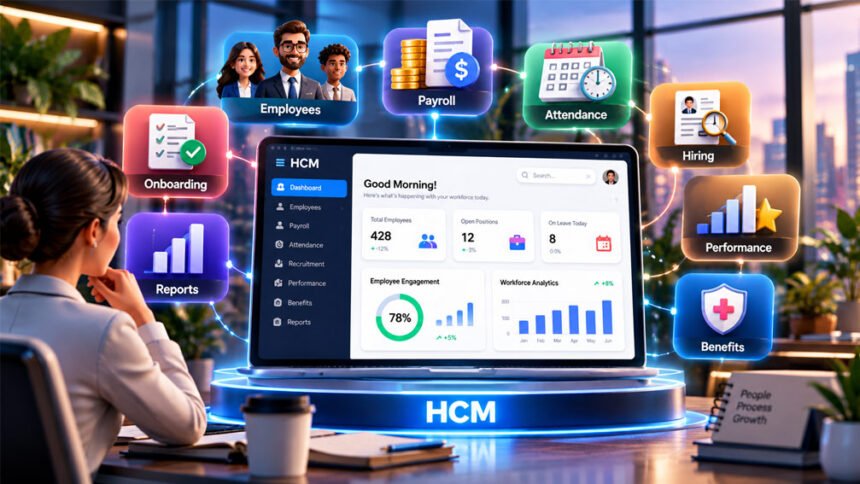
An HCM platform is software that helps a business manage its employees and HR work. HCM stands for Human Capital Management.
Businesses can use an HCM platform for employee records, payroll, attendance, hiring, onboarding, benefits, performance, and other HR tasks. This guide explains how an HCM platform works, its main features, benefits, costs, and possible problems.
What Is an HCM Platform?
An HCM platform is a software system that helps a business manage its employees. It brings many HR tasks into one place.
Instead of using paper files, spreadsheets, emails, and different tools, a company can use an HCM system to organize its HR work.
HCM can cover many stages of an employee’s time at a company. This may start with recruitment and onboarding. It can continue with payroll, attendance, benefits, performance, and employee development. It may also help when an employee leaves the company.
Different people can use the platform. HR teams can manage employee records and hiring. Payroll teams can manage pay. Managers can check attendance and performance. Employees may request leave, update their information, or view benefits.
Finance and accounting teams may also use HCM data. For example, payroll and labor costs can affect company budgets and financial reports.
Many modern HCM platforms are cloud-based. This means users can access them online. Some providers also offer mobile apps.
How Does an HCM Platform Work?
An HCM platform stores and organizes employee information.
This can include names, job titles, departments, pay details, working hours, benefits, leave records, and company documents.
The system can then use this information for different HR tasks.
For example, information collected when a person is hired may also be used for onboarding, payroll, benefits, attendance, and reports. This reduces the need to enter the same information again and again.
HCM platforms can also automate simple tasks. For example, an employee can send a leave request through the system. The manager can approve it, and the leave record can then be updated.
Access usually depends on the user’s role. Employees may see their own information. Managers may see information about their teams. HR administrators normally have access to more areas of the system.
HCM software can also create reports and dashboards. These can show information about attendance, hiring, employee performance, labor costs, and other workforce areas.
Some HCM platforms keep many HR tools inside one system. Others connect with separate payroll, accounting, benefits, or HR software.
Example of How HCM Works
Imagine a company is hiring a new employee.
The company posts a job and collects applications. After choosing a person, their information can move into the onboarding process.
The new employee may complete forms, read company policies, provide personal information, and choose benefits.
Their information can then be used for payroll and attendance. Managers may later use the system for performance reviews and employee development.
When the employee leaves the company, the platform may also help with offboarding.
The exact process depends on the HCM platform.
Main Features of an HCM Platform
HCM platforms do not all offer the same features. Some provide basic HR and payroll tools. Others include advanced tools for large businesses.
Core HR and Employee Records
HCM platforms can store important employee information in one place.
This may include contact details, job information, department, employment status, documents, and other work records.
Some systems also store digital personnel files and company policies.
Payroll and Tax Management
Many HCM platforms include payroll tools or connect with payroll software.
These tools can help businesses calculate employee pay, keep payroll records, and create reports.
Some systems may also help with tax forms and tax filings.
Payroll features depend on the provider and country. Businesses should check what is included before choosing a platform.
Time, Attendance, and Leave
HCM software can track working hours and attendance.
It may also manage paid time off, sick leave, timecards, and other types of leave.
Some systems can support different leave rules for different groups or locations.
Recruitment and Talent Acquisition
Recruitment tools help businesses find and hire employees.
Companies may use them to post jobs, collect applications, manage candidates, and follow the hiring process.
When a candidate is hired, their information may move directly into the onboarding system.
Employee Onboarding and Offboarding
Onboarding tools help new employees get started.
Employees may complete forms, provide information, read policies, and learn about company benefits.
Some HCM systems can also keep records of company equipment given to employees.
Offboarding tools help manage tasks when an employee leaves.
Benefits Management
HCM platforms may help businesses manage employee benefits.
Employees may be able to view available benefits and make their choices through the system.
Some platforms also connect with insurance companies, benefits providers, and retirement services.
Performance and Talent Management
Performance tools help businesses review employee work.
They may include performance reviews, feedback, goals, training, and development plans.
Some platforms can also help companies find skill gaps and plan employee training.
Employee Engagement
Some HCM platforms include employee engagement tools.
These may include surveys, feedback tools, and communication features.
Businesses can use this information to better understand the employee experience.
Reporting and Workforce Analytics
HCM platforms can create reports and dashboards from workforce data.
These reports may cover payroll, attendance, hiring, leave, labor costs, and employee performance.
This information can help HR teams and managers make better decisions.
Compliance Tools
Some HCM systems provide tools that can help with workplace rules and reporting.
In the United States, these may include EEOC reports, OSHA records, FMLA administration, payroll taxes, and state leave policies.
However, using an HCM platform does not automatically make a business legally compliant. The company is still responsible for following the laws that apply to it.
HCM vs. HRIS vs. HRMS
HCM, HRIS, and HRMS are related terms. Their meanings can sometimes overlap.
HRIS means Human Resources Information System. It usually focuses on employee records and basic HR tasks.
HRMS means Human Resources Management System. It is often used for software that manages several HR processes.
HCM means Human Capital Management. It often includes basic HR tools plus hiring, performance, talent management, employee development, and workforce analytics.
However, software companies do not always use these names in the same way.
Businesses should compare the actual features instead of choosing software only because it is called HCM, HRIS, or HRMS.
Single HCM Platform vs. Integrated HR Systems
A company can use one HCM platform or several connected HR systems.
A single HCM platform keeps many HR functions inside the same system. Employee records, payroll, attendance, benefits, and other tools may share the same information.
An integrated HR system may use several separate programs that send information to each other.
Sometimes these programs use one login. However, one login does not always mean everything is part of the same system.
Poor integrations can cause problems. Information may arrive late, appear differently in two systems, or need to be entered more than once.
A single platform may make data management easier. It can also give users a more similar experience across different HR tools.
However, one platform does not guarantee perfect information. Human mistakes and poor setup can still cause problems.
Connected systems can also work well when their integrations are properly designed.
Businesses should ask vendors how their systems share information and whether data is updated in real time.
Benefits of Using an HCM Platform
An HCM platform can reduce manual HR work.
Employees and HR teams may no longer need to use as many paper forms, spreadsheets, emails, or separate systems.
Automation can also save time. It may reduce mistakes caused by entering the same information several times.
Keeping employee records in one place makes information easier for approved users to find.
Employees may also complete simple tasks themselves. They may request leave, update information, or check their benefits without asking HR to do everything for them.
HCM software can also make recruitment and onboarding easier to manage.
Reports and dashboards give businesses a clearer view of attendance, labor costs, hiring, performance, and other workforce information.
However, these benefits depend on the quality of the platform and how well the business sets it up and uses it.
Drawbacks and Challenges of HCM Platforms
Setting up an HCM platform can take time.
A business may need to move employee records from old systems, clean its data, set up payroll rules, add leave policies, and connect other software.
Employees and managers may also need training.
Some large HCM platforms can be difficult to use. Smaller platforms may be easier but may not have enough features for a growing company.
Integrations can cause problems if information does not move correctly between systems.
The total cost may also be higher than the advertised price. Extra modules, implementation, training, integrations, and support may cost more.
Businesses should also make sure they can easily download their information if they decide to change providers.
Security is another concern because HCM platforms can store sensitive employee information.
HCM Security and Employee Data Privacy
HCM platforms can hold private employee information. This may include contact details, salaries, tax records, benefits, attendance, and performance information.
Businesses should check how an HCM provider protects this data.
Important security features may include strong login methods, user permissions, encryption, backups, and activity records.
Employees should only have access to the information they need.
Companies should also check how information is protected when the HCM platform connects with payroll, accounting, benefits, or other systems.
Privacy laws can be different depending on the country or region. Businesses need to understand the rules that apply to their employees.
It is also important to know how company data can be downloaded if the business changes HCM providers.
How Much Does an HCM Platform Cost?
There is no fixed price for an HCM platform.
The cost depends on the provider, number of employees, features, payroll needs, and other services.
Some providers charge per employee per month (PEPM). Others may charge per employee per payroll (PEPP).
Some platforms have a fixed subscription price. Others charge separately for different modules.
Extra costs may include:
- Implementation
- Payroll processing
- Extra modules
- Tax services
- Customer support
- Training
- Integrations
- Benefits management
Businesses should check the full monthly and yearly cost before choosing a platform.
There may also be transition costs when moving from an old system to a new one.
HCM Platform Implementation
HCM implementation means setting up the platform for the business.
First, the company decides what it needs from the system. Employee records, payroll rules, leave policies, benefits, and other settings can then be added.
Existing employee information may need to be moved from spreadsheets or older software.
The HCM platform may also need to connect with accounting, payroll, benefits, or retirement systems.
User permissions must be set carefully. Employees, managers, HR staff, and payroll teams may need different levels of access.
The system should be tested before launch. Important areas such as payroll, leave requests, reports, and integrations should work correctly.
Employees and managers may also need training.
One source used for this guide suggests that implementation may take around two weeks to two months. However, there is no fixed time.
Large companies or businesses with complex payroll, many locations, special policies, or many integrations may need more time.
How to Choose the Right HCM Platform
Start by deciding what your business actually needs.
Make one list for features you must have and another for features you would like to have.
Think about future growth as well. A platform that works today should ideally still be useful as the company grows.
Look at the full cost, not only the basic subscription price.
HR teams should also speak with payroll, finance, IT, managers, and other people who may use the system.
Check the vendor’s customer support, security, reporting tools, integrations, customization options, and data export features.
Questions to Ask HCM Vendors
Before choosing an HCM provider, ask questions such as:
- What features are included?
- Which features cost extra?
- How is pricing calculated?
- Are there implementation fees?
- Is customer support included?
- Can we make system changes ourselves?
- Can we export our data?
- Can we download stored documents?
- How do different modules share information?
- Is data updated in real time?
- Do users need different logins?
- Which integrations are supported?
- How is employee information protected?
- What training and setup help are included?
These questions can make it easier to compare different HCM platforms.
Why HCM Demos and Testing Matter
A feature list does not always show how easy software is to use.
Ask the vendor to show how important tasks work instead of simply asking whether a feature exists.
For example, ask the vendor to show how an employee requests leave or how a manager finds a report.
Test the platform from different user roles. HR staff, managers, and employees may see different screens and tools.
If possible, ask for a demo or test account. This gives your team a chance to use the platform before buying it.
People from HR, payroll, finance, IT, and other important departments can also help test the system.
HCM Platforms and AI
Some modern HCM platforms use artificial intelligence.
AI may help automate simple tasks, organize information, support recruitment, and study workforce data.
Some tools may also help identify employee skills or suggest training and development options.
AI features are different on every platform. A system described as “AI-powered” may only use AI for a few tools.
Businesses should understand how an AI feature works before using it for important decisions.
Privacy, accuracy, security, and human review are especially important when AI is used for decisions about employees or job candidates.
HCM Platforms for Remote and Hybrid Work
HCM platforms can also help companies manage remote and hybrid employees.
Workers may be able to complete onboarding, view documents, update personal information, request leave, and manage benefits online.
Managers can access approved workforce information from different locations.
Some systems also offer online training, attendance, communication, and employee development tools.
Mobile apps may make the platform easier to use away from a computer.
Businesses with workers in different countries should check whether the platform supports their locations, languages, payroll needs, time zones, and employment rules.
Common HCM Mistakes to Avoid
Businesses should avoid choosing an HCM platform too quickly.
A short demo may not show how the software works during everyday use.
Do not buy extra features just because they are available. They may increase the cost without helping your business.
At the same time, think about future growth. A very basic platform may become too limited later.
Do not look only at the advertised price. Check implementation, support, training, integrations, tax services, and other possible costs.
Test important integrations before depending on them.
Also check whether you can easily export your data.
Businesses should understand what customer support is included and whether some types of help cost extra.
Finally, remember that HCM software can help with compliance, but it cannot guarantee that your business follows every law correctly.
Bottom Line
An HCM platform helps businesses manage employees and HR tasks in one digital system.
It can handle employee records, payroll, attendance, hiring, onboarding, benefits, performance, reporting, and other workforce tasks.
The right HCM platform depends on your business size, needs, budget, security requirements, and future plans.
Compare the actual features, full cost, support, security, integrations, and ease of use before choosing a platform.
Frequently Asked Questions
What does HCM stand for?
HCM stands for Human Capital Management. It means managing employees and their work needs.
What is an HCM platform used for?
An HCM platform helps businesses manage payroll, hiring, attendance, benefits, employee records, and other HR tasks.
How does an HCM platform work?
It stores employee information in one system. It also helps automate HR tasks and create useful reports.
What is the difference between HCM and HRIS?
HRIS mainly manages employee records and basic HR tasks. HCM usually includes more tools for hiring, performance, and employee development.
Does an HCM platform include payroll?
Many HCM platforms include payroll or connect with payroll software. It depends on the platform you choose.
How much does an HCM platform cost?
There is no fixed price. The cost depends on the number of employees, features, and services you need.
How long does HCM implementation take?
It depends on the company and platform. Simple setups may be faster, while larger or more complex systems can take longer.
What should a business look for in an HCM platform?
Look for useful features, fair pricing, easy use, good security, integrations, reporting, and reliable customer support.
More To Explore: