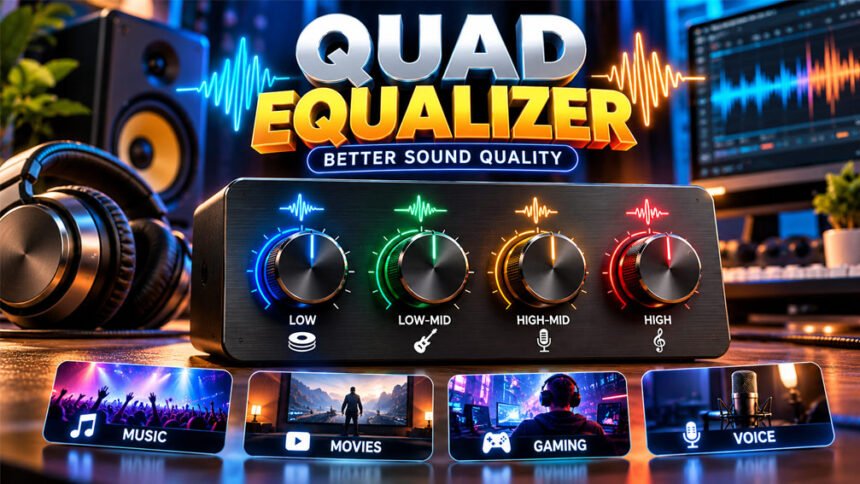
A Quad Equalizer is a tool that helps you control sound. It lets you change different parts of the audio, such as bass, middle sounds, and treble.
Most Quad Equalizers have four sound bands: low, low-mid, high-mid, and high. However, in some professional audio equipment, “quad” can also mean four separate audio channels.
People use a Quad Equalizer when bass is too strong, voices are unclear, or high sounds are too sharp. This guide explains how it works, how to use its controls, and how to find better settings for different types of audio.
What Is a Quad Equalizer?
A Quad Equalizer is an audio tool that changes the balance of sound. Instead of changing all the sound at once, it lets you control different frequency areas.
The word quad means four. In a four-band equalizer, the audio is divided into four main areas: low, low-mid, high-mid, and high.
A four-channel equalizer is different. It works with four separate audio signals. Professional sound systems may use these channels for different speakers or microphones.
The term can also have other meanings. Older quadraphonic audio systems used four sound channels. In electronics, a quad equalizer can also mean a device that manages four high-speed data signals. This is different from an audio equalizer.
Check the controls on your device if you are unsure. Four frequency controls usually mean a four-band EQ. Four controls marked Channel 1 to Channel 4 usually mean a four-channel system.
How Does a Quad Equalizer Work?
Sound contains different frequencies. Low frequencies create deep bass. Middle frequencies contain much of the sound from voices and instruments. High frequencies add brightness and fine details.
A Quad Equalizer lets you increase or reduce these frequencies.
Changes are usually measured in decibels (dB). A setting such as +2 dB increases a frequency. A setting such as -2 dB reduces it. At 0 dB, there is no boost or cut.
For example, too much bass can make a singer’s voice harder to hear. Reducing the low or low-mid band may make the voice clearer.
Small changes are usually better. A change of only 1 to 3 dB can make a noticeable difference.
Understanding the Four Frequency Bands
A common four-band equalizer has low, low-mid, high-mid, and high frequency controls.
The exact ranges can change between equalizers. However, these are useful general ranges:
| Band | Typical Range | Mainly Controls |
|---|---|---|
| Low | 20 Hz–250 Hz | Bass and deep sounds |
| Low-mid | 250 Hz–2 kHz | Warmth, vocals, guitars |
| High-mid | 2 kHz–6 kHz | Vocal clarity and detail |
| High | 6 kHz–20 kHz | Treble and brightness |
Low Frequencies
Low frequencies control bass and deep sounds. They affect bass guitars, kick drums, electronic bass, and deep movie effects.
A small boost can make bass stronger. Too much bass, however, can hide vocals and make small speakers sound boomy.
If the bass feels too heavy, reduce the low band slightly.
Low-Mid Frequencies
Low-mid frequencies add warmth and body to voices and instruments. Vocals, guitars, and pianos have a lot of sound in this area.
Too much low-mid can make audio sound muddy or thick. A small cut can often make voices and instruments clearer.
Do not cut too much because the audio may start to sound thin.
High-Mid Frequencies
High-mid frequencies help with clarity and presence. They are important for voices, guitars, and many small sound details.
A small boost can make speech clearer. It can also help you hear details such as footsteps in games.
Too much high-mid can make voices and instruments sound sharp or harsh.
High Frequencies
High frequencies control treble, brightness, and fine details.
A small boost can make dull audio sound brighter. Reducing this band can help when speakers or headphones sound too sharp.
Too much treble may also make hiss more noticeable.
Types of Quad Equalizers
Quad Equalizers come in different forms. Some are simple, while others give you more control.
Graphic Quad Equalizer
A graphic equalizer normally has fixed frequency bands. You can increase or reduce each band using sliders or other controls.
It is simple to use and works well for basic sound changes.
The main limit is that you usually cannot choose the exact frequency you want to change.
Parametric Quad Equalizer
A parametric equalizer gives you more control. It may let you adjust frequency, gain, and Q.
Frequency selects the sound area. Gain controls how much you increase or reduce it. Q controls how wide or narrow the change is.
This type is useful for recording, mixing, and fixing more specific sound problems.
Semi-Parametric Equalizer
A semi-parametric equalizer offers some of the controls found on a full parametric EQ.
For example, it may let you change frequency and gain while keeping the Q setting fixed.
This type is often found on audio mixers.
Digital and Software Equalizers
Digital equalizers use digital processing to change sound. Some can save presets, show frequency levels, use filters, or control several audio channels.
Software equalizers work on computers, phones, music players, and other digital devices.
Features depend on the software or device. Some have only simple controls, while professional programs offer many detailed settings.
Important Quad Equalizer Controls
Knowing the main controls makes a Quad Equalizer much easier to use.
Frequency
Frequency tells the equalizer which part of the sound you want to change. It is measured in hertz (Hz).
Low numbers affect deep sounds. Higher numbers affect brighter sounds and vocal detail.
For example, 100 Hz mainly affects bass, while an area around 3 kHz can affect vocal clarity.
Gain
Gain controls how much you increase or reduce a frequency.
For example, +2 dB gives a small boost. A setting of -2 dB gives a small cut.
Large boosts can cause distortion or clipping, so small changes are usually safer.
Q Factor
The Q factor controls how much of the nearby frequency range is changed.
A low Q affects a wider area. A high Q focuses on a smaller area.
Simple four-band equalizers may not have this control.
Bypass and Output Control
A bypass button turns the EQ off for a moment. This helps you compare your new settings with the original sound.
Try to compare both at about the same volume. Louder audio can sometimes seem better even when it is not clearer.
Some equalizers also have an output or preamp control. Lowering it can help prevent clipping when several frequencies have been boosted.
Filters, Presets, and Channel Linking
Advanced equalizers may have extra features.
A high-pass filter can reduce very low sounds such as rumble. A low-pass filter can reduce very high frequencies.
Some equalizers let you save different settings for music, gaming, speakers, or headphones.
Professional four-channel systems may also have channel linking. This lets two channels use the same settings.
Some digital equalizers also show a live frequency graph. It can help find problem areas, but you should still use your ears when making the final changes.
How to Set Up a Quad Equalizer
Start by connecting your hardware equalizer or opening the EQ settings on your device.
Set all four bands to 0 dB. This gives you a clean starting point.
If possible, turn off other sound effects such as bass boost, loudness mode, virtual surround, or another EQ. Using several sound effects together can make the audio harder to adjust.
Play music or another audio recording that you know well. Listen for one clear problem.
If the bass is too strong, lower the low band slightly. If vocals sound muddy, try reducing the low-mid band. If voices are unclear, try a small high-mid boost.
Change only one band at a time. Listen after every change.
If your equalizer has a bypass button, use it to compare the original and changed sound.
Stop when the sound is clear and balanced. You do not need to change every band.
Best Quad Equalizer Settings
There is no single best Quad Equalizer setting.
The best settings depend on your speakers, headphones, room, audio source, and personal preference.
Start at 0 dB and make small changes based on what you hear.
For Music
Keep the settings close to flat if the music already sounds good.
If bass is weak, add a small low-frequency boost. If bass is covering the vocals, reduce the low or low-mid band.
If music sounds dull, add a little treble. If it sounds too sharp, reduce the high band.
For Movies and Dialogue
For movies, clear voices are usually important.
If strong bass makes dialogue difficult to hear, lower the low band slightly.
A small high-mid boost may also make speech clearer. Avoid adding too much because voices can become sharp.
For Gaming
Heavy bass from explosions and effects can sometimes hide smaller game sounds.
Reducing the bass slightly may make footsteps, voices, and other details easier to hear. A small high-mid boost may also help.
EQ cannot create true positional sound on its own. This also depends on the game, headset, and audio system.
For Podcasts and Voice Calls
For speech, try to keep the bass clean and controlled.
Reducing some low or low-mid sound may make a voice less boomy. A small high-mid boost may make words clearer.
EQ cannot remove all background noise. Other tools may be needed for traffic, keyboard sounds, room echo, or other voices.
For Car Audio
Sound behaves differently inside a car because of the seats, windows, speaker positions, and small space.
If bass sounds too heavy, reduce the low or low-mid band slightly. If music sounds dull, try a small treble boost.
Make one change at a time. Adjust detailed EQ settings while the car is parked.
Where Quad Equalizers Are Used
Quad Equalizers can be used with many types of audio equipment.
At home, people may use them with headphones, speakers, TVs, music players, and home entertainment systems.
Professional users may use equalizers in recording studios, concerts, churches, conference halls, and broadcast systems.
They are also used for gaming, podcasts, streaming, car audio, and guitar or bass amplifiers.
Quad Equalizer for Music Production
A four-band EQ can help producers control vocals and instruments during recording and mixing.
For example, a vocal may sound muddy because it has too much low-mid sound. Reducing this area slightly can make the voice clearer.
EQ also helps instruments fit together. Sometimes two instruments use similar frequencies and cover each other. This is called frequency masking.
Small EQ cuts can create more space between these instruments.
A four-band EQ is useful for general changes. More difficult sound problems may need a parametric equalizer or an EQ with more bands.
Quad Equalizer for Guitar and Bass
Some guitar and bass amplifiers have Bass, Low-Mid, High-Mid, and Treble controls.
Bass controls the deep sound. Low-mid controls warmth and body. High-mid helps notes stand out. Treble controls brightness.
If a guitar sounds too thick, reducing the low-mid band may make it clearer. A small high-mid boost may help the guitar stand out.
Bass players can use the same controls to balance deep bass with clearer notes.
The best settings depend on the instrument, amplifier, speakers, room, and music style.
Quad Equalizer vs Other Equalizers
Equalizers can have different numbers of bands.
| EQ Type | Main Control | Common Use |
|---|---|---|
| 3-band EQ | Bass, mid, treble | Basic sound control |
| 4-band EQ | Low, low-mid, high-mid, high | More midrange control |
| 5-band EQ | Five sound areas | More detailed control |
| 10-band EQ | Ten sound areas | Finer sound adjustment |
A 4-band EQ gives more control than a basic 3-band EQ without adding too many settings.
A 10-band EQ gives you more frequency areas to adjust. This can help when you need more detailed changes.
However, more bands do not always mean better sound. A four-band parametric EQ can still offer detailed control because you may be able to adjust frequency, gain, and Q.
Remember that a four-band EQ and a four-channel EQ are different. Four bands control frequency areas. Four channels control separate audio signals.
Benefits of Using a Quad Equalizer
A Quad Equalizer gives you more sound control than simple bass and treble settings.
It can make voices clearer, reduce muddy bass, soften harsh sounds, and improve the balance between instruments.
You can also use different settings for headphones, speakers, rooms, or other listening situations.
Sometimes EQ can improve your current audio setup without buying new equipment. However, this only works when the main problem is sound balance.
What a Quad Equalizer Cannot Do
A Quad Equalizer cannot fix every sound problem.
It cannot repair damaged headphones or speakers. It also cannot bring back audio details that were lost because of a poor recording or heavy compression.
Adding more bass cannot turn a small speaker into a real subwoofer. Too much bass boost may simply cause distortion.
EQ also cannot remove every type of background noise. It may reduce some rumble, hum, or hiss, but other noise may need different tools.
Surround sound, spatial audio, noise cancellation, compression, and limiting are also separate audio features.
Before making large EQ changes, check your equipment setup. Moving speakers or a microphone, improving headphone fit, or reducing room echo may sometimes help more than EQ.
Common Quad Equalizer Problems and Fixes
Muddy Sound
Too much bass or low-mid sound can make audio muddy.
Reduce the low-mid band slightly. If the bass is also too heavy, try a small low-frequency cut.
Weak Bass
First check your speakers, headphones, and speaker position.
If everything is set up correctly, try a small bass boost. Avoid large boosts, especially with small speakers.
Harsh Vocals
Too much high-mid sound can make voices harsh.
Lower the high-mid band slightly. Do not reduce it too much, or the voice may lose clarity.
Sharp or Bright Treble
If the audio sounds too sharp, lower the high band a little.
Make small changes until the harsh sound is reduced without making the audio dull.
Distortion or Clipping
Large boosts can make the audio signal too strong and cause clipping or distortion.
Reduce the boosted bands. You can also lower the output or preamp level if your equalizer has this control.
EQ Changes Sound Wrong
If the sound becomes worse, return all bands to 0 dB and start again.
Also check if another app or device is using its own EQ. Several equalizers working together can create poor sound.
Use one EQ when possible and adjust one band at a time.
Common Mistakes to Avoid
One common mistake is boosting every frequency. This can make the audio louder without making it better.
Other mistakes include:
- Making very large changes.
- Changing all four bands at once.
- Using the same settings for every device.
- Copying another person’s EQ settings without testing them.
- Comparing settings at different volumes.
- Adding too much bass to small speakers.
- Using several equalizers at the same time.
- Ignoring distortion or clipping.
- Looking only at frequency graphs instead of listening.
Sometimes a nearly flat EQ gives the best sound.
Tips for Better Sound
Start with all bands at 0 dB and use audio that you know well.
For better results:
- Change one sound problem at a time.
- Start with small changes of about 1–3 dB.
- Try cutting unwanted sound before making a large boost.
- Keep the volume similar when comparing settings.
- Use the bypass button if available.
- Listen for distortion after making boosts.
- Save different settings for different devices.
- Stop adjusting when the sound becomes clear and balanced.
A setting made for headphones may not work well with speakers or car audio. Separate settings usually give better results.
Can a Quad Equalizer Improve Sound Quality?
Yes. A Quad Equalizer can improve sound when the problem is caused by poor frequency balance.
It can make voices clearer, reduce heavy bass, control sharp treble, and make music sound more balanced.
However, better sound does not always mean more bass or treble. Sometimes reducing one problem frequency gives a better result than boosting several others.
The improvement also depends on your equipment and the original audio quality.
Bottom Line
A Quad Equalizer gives you more control over your audio. A common four-band EQ lets you adjust low, low-mid, high-mid, and high frequencies.
The best way to use it is simple. Start at 0 dB, listen for a problem, and make one small change at a time.
There is no perfect setting for everyone. Your headphones, speakers, room, audio source, and personal preference all affect the final sound.
Frequently Asked Questions
What is a Quad Equalizer used for?
It helps control different parts of sound. You can use it to improve bass, voices, treble, and overall sound balance.
What are the four bands of a Quad Equalizer?
The four common bands are low, low-mid, high-mid, and high. They control bass, warmth, clarity, and treble.
Does “quad” mean four bands or four channels?
It can mean both. Some equalizers have four sound bands, while others have four separate audio channels.
What is the best Quad Equalizer setting?
There is no one best setting. Start at 0 dB and make small changes until the sound feels clear and balanced.
Can a Quad Equalizer improve voice clarity?
Yes. Lowering some low sounds and slightly raising the high-mid range can make voices easier to hear.
Is a Quad Equalizer good for gaming?
Yes. The right settings can make footsteps, voices, and other important game sounds easier to hear.
Can EQ settings damage speakers?
Very high boosts and loud volume can put extra stress on speakers. Small changes and safe volume levels are better.
Is a 4-band or 10-band equalizer better?
A 4-band EQ is simpler to use. A 10-band EQ gives you more control for detailed sound changes.
More To Explore: