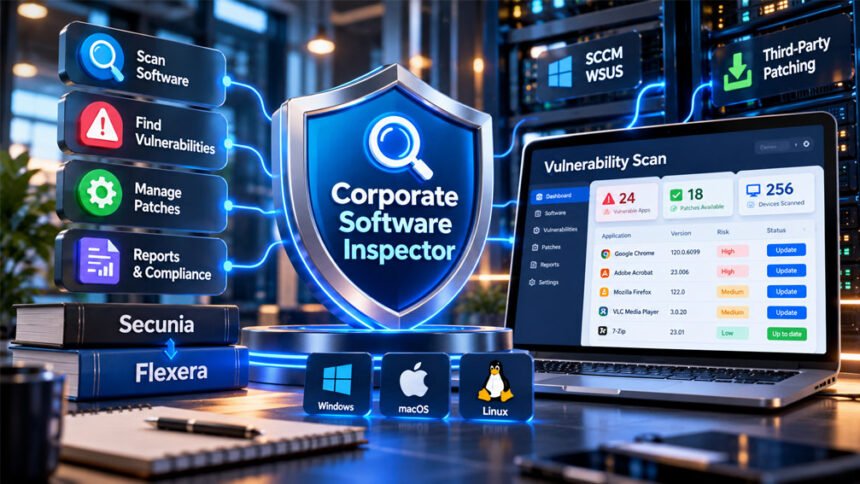
Corporate Software Inspector (CSI) is a security tool made for businesses. It helps IT teams find outdated or unsafe software and manage security updates.
CSI was first connected with Secunia. It later became part of Flexera’s product portfolio. Over time, the product changed and became connected with Software Vulnerability Manager.
This guide explains what Corporate Software Inspector is, how it works, its main features, benefits, limitations, integrations, and history.
What Is Corporate Software Inspector?
Corporate Software Inspector is a security solution for businesses. It helps companies find software that may have known security problems.
Large companies may have hundreds or thousands of computers. These computers can have many different programs and software versions. Checking every program by hand would take a lot of time.
CSI makes this easier. It scans systems and creates a list of installed software and versions. It can then compare this information with known security vulnerabilities.
When it finds vulnerable software, IT teams can see which programs need attention. They can then install available security patches.
CSI is mainly an enterprise tool. It is not a normal antivirus program or a simple software updater for home users.
Secunia, Flexera, and the History of Corporate Software Inspector
Corporate Software Inspector was originally a product from Secunia, a company known for software security and vulnerability research.
Secunia created tools that helped users and businesses find unsafe or outdated software. Corporate Software Inspector was designed mainly for business networks.
Flexera acquired Secunia in 2015. Secunia’s vulnerability-management technology then became part of Flexera’s product portfolio.
Over time, the product changed and became connected with Software Vulnerability Manager. The newer name better describes its wider focus on finding, managing, and fixing software vulnerabilities.
This is why older information may call the product Secunia CSI, Secunia Corporate Software Inspector, or Flexera Corporate Software Inspector. Newer information may use Software Vulnerability Manager instead.
Old CSI information should be used carefully. Features, supported systems, integrations, prices, and requirements may have changed over time.
How Corporate Software Inspector Works
Corporate Software Inspector follows a simple process. It finds installed software, checks it for known security problems, helps apply fixes, and then checks the systems again.
1. Software Scanning and Discovery
CSI first scans computers and servers to find installed software.
It records useful details such as the program name and software version. This creates a central software inventory for the organization.
Software versions are important. An older version may contain a known security problem that has already been fixed in a newer version.
The collected information also describes authenticated scanning. This means CSI can use approved access to collect more detailed information from managed systems.
A good software inventory helps security teams know what is installed and where it is running.
2. Vulnerability Detection
CSI then compares the installed software with known vulnerability information.
This can include CVEs. CVE stands for Common Vulnerabilities and Exposures. It is a system used to identify publicly known security vulnerabilities.
If CSI finds a software version linked to a known vulnerability, it can show the affected system to the security team.
The collected information says vulnerability data was updated regularly and could include information from the National Vulnerability Database and software companies’ security notices.
CSI can also help teams decide which vulnerabilities need attention first. A serious security problem on an important system may need faster action than a low-risk problem.
3. Patch Selection and Deployment
After finding vulnerable software, the next step is fixing it.
A patch is an update that fixes a software problem. CSI can help businesses manage patches for supported applications.
Third-party patching is especially important. Third-party programs are applications made by companies other than Microsoft. These programs can also contain security problems.
CSI can provide prepared patch packages for supported software. This can save IT teams from creating every update package manually.
It can also work with SCCM and WSUS. Businesses already using these Microsoft tools can use their existing systems to help distribute updates.
Important patches should still be tested before they are installed across the whole company. Some updates can cause software or compatibility problems.
4. Rescanning and Verification
Installing a patch does not always mean it worked.
A computer may have been offline. An installation may have failed. Some systems may still be running the old software version.
CSI can scan systems again after patching. This helps IT teams check whether the vulnerability was actually fixed.
The basic process is:
Find software → find vulnerabilities → decide what to fix first → install patches → scan again.
This process continues because new vulnerabilities and software updates appear over time.
Main Features of Corporate Software Inspector
CSI includes several tools for finding and managing software security problems.
Software Inventory and Vulnerability Scanning
CSI can create an inventory of software installed across managed systems.
It can track application versions and compare them with known vulnerability information.
This helps security teams see which programs are vulnerable and which computers may need updates.
It is especially useful for large organizations where checking every computer manually would be difficult.
Vulnerability Prioritization
A company may find many vulnerabilities at the same time. It may not be possible to fix all of them immediately.
CSI can help teams decide which problems should be handled first.
The collected information mentions factors such as how serious the vulnerability is, whether attackers may be able to use it, and how important the affected system is.
Companies still need their own security teams to make final decisions based on their systems and risks.
Third-Party Patch Management
Third-party patch management is an important CSI feature.
Businesses use many programs besides Windows and Microsoft software. Browsers, utilities, document tools, development software, and other applications can also have vulnerabilities.
CSI helps manage updates for supported third-party programs.
Prepared patch packages can reduce the amount of manual work needed to create and distribute updates.
Some collected material says CSI covers more than 20,000 applications or programs. However, other parts use the same number when talking about vulnerabilities. Because these claims are not consistent, the exact number should be checked in official information for the product version being used.
Dashboards and Reporting
CSI can provide reports about an organization’s software and vulnerabilities.
These reports can show information about vulnerable programs, affected systems, patching progress, and completed fixes.
Dashboards can help IT and security teams quickly understand the current situation.
Reports may also help during security reviews and audits.
Supported Platforms and Software Coverage
Historical information about Corporate Software Inspector mentions support for Windows, Mac OS X/macOS, and Red Hat Enterprise Linux (RHEL).
However, CSI changed over time. Support can be different between old CSI versions and newer Flexera products.
The tool also focused strongly on third-party software. This was useful because businesses often use many applications from different software companies.
Some collected information claims coverage of more than 20,000 applications. Another part describes more than 20,000 vulnerabilities.
These are different things, so the exact number should be treated carefully.
The main point is that CSI was designed to find vulnerable third-party software across business systems and help IT teams manage the problem.
SCCM, WSUS, and Other Integrations
Corporate Software Inspector can work with existing IT management systems.
Two important integrations are Microsoft System Center Configuration Manager (SCCM) and Windows Server Update Services (WSUS).
SCCM is used by many businesses to manage computers, software, and updates. CSI can work with this type of system to help manage third-party patches.
WSUS is another Microsoft tool used to manage Windows updates. CSI integration can help businesses use existing update systems while also managing supported third-party applications.
The collected material also mentions possible connections with tools such as ServiceNow, BMC Remedy, SIEM systems, Configuration Management Databases, and business reporting tools.
These extra integrations may depend on the product version. Businesses should check current product information before assuming a specific integration is available.
Security and Compliance Uses
CSI can help companies reduce risks caused by outdated software.
Finding vulnerable applications quickly can help IT teams install fixes sooner. This reduces the time that known security problems remain open.
CSI can also create reports about vulnerabilities and patches. These records may help during security reviews and audits.
The collected information connects CSI with security needs related to ISO 27001, NIST, HIPAA, GDPR, and other frameworks or rules.
However, using CSI does not automatically make a company compliant.
For example, GDPR covers many areas of personal data protection. HIPAA also includes many security and privacy requirements.
CSI can support vulnerability management and reporting, but a company still needs other policies and security controls.
Benefits of Corporate Software Inspector
One important benefit is having software and vulnerability information in one place.
CSI can help companies find outdated software without checking every computer by hand.
Its third-party patching features are also useful. Updating Windows alone does not protect vulnerable software from other companies.
Prepared patch packages can reduce manual work for IT teams.
CSI can also help teams focus on important vulnerabilities first instead of treating every security issue as equally serious.
Integration with SCCM and WSUS can be useful for companies already using Microsoft management tools.
Rescanning is another benefit because it helps confirm whether a patch was actually installed.
The real results depend on the company’s systems, staff, setup, and patching process.
Limitations and Important Considerations
Corporate Software Inspector is mainly made for businesses. It may be too complex for someone managing only a personal computer.
Setup can also require technical knowledge. IT teams need to correctly configure scanning, permissions, network access, and patch deployment.
Automatic patching does not remove every risk. Important updates should still be tested because a patch can sometimes cause compatibility problems.
Some old, custom, or uncommon programs may not be supported. These applications may need to be managed manually.
CSI also depends on known vulnerability information. It cannot guarantee that it will find a security problem that has not yet been discovered or documented.
Another issue is old information. CSI has changed over time, so old guides and system requirements may not match newer Flexera products.
Clear current pricing was not found in the information collected for this article. Businesses should check with the vendor for current pricing and licensing details.
Corporate Software Inspector vs. Traditional Patch Management
Traditional patch management can involve checking programs manually, finding updates, preparing packages, installing them, and checking whether they worked.
This becomes difficult when a business has hundreds or thousands of computers.
CSI makes more of this process central. It can find installed software, identify known vulnerabilities, and connect this information with patch management.
Prepared third-party patches can also reduce manual work.
Central reporting makes it easier to see which systems are still vulnerable and which have been fixed.
However, CSI is not the only enterprise tool that can manage third-party software. Other modern vulnerability and patch-management products offer similar features.
CSI’s main approach is to bring software inventory, vulnerability information, prioritization, patching, and reporting into one workflow.
Who Is Corporate Software Inspector For?
Corporate Software Inspector is mainly designed for medium and large organizations.
IT teams can use it to find outdated software and manage updates. Security teams can use it to identify and prioritize vulnerabilities. Compliance teams can use reports during reviews and audits.
It may be useful for healthcare companies, financial organizations, government agencies, manufacturers, and educational institutions.
These organizations may manage many computers and different types of software.
CSI is generally not needed by home users with only one or two computers.
Deployment Requirements and Best Practices
Businesses should understand their systems before setting up CSI.
A good software and device inventory is important. IT teams should know which computers, servers, and applications need to be managed.
Correct permissions are also needed. Detailed scanning may require administrator access.
Network access should be properly configured so scanning, updates, and patch deployment can work.
Companies using SCCM or WSUS should plan how CSI will work with these existing systems.
Important patches should be tested on a small number of computers first. If there are no major problems, they can then be sent to more systems.
IT teams should also check for failed installations and scan systems again after patching.
High-risk vulnerabilities should usually receive faster attention than less serious problems.
CSI should also be used as part of a wider security plan. Patch management cannot replace backups, access controls, endpoint security, monitoring, secure settings, and other protections.
Corporate Software Inspector Performance Claims: What to Know
Some collected material makes strong claims about CSI’s results.
One claim says organizations can reduce unpatched vulnerabilities by 50% within 90 days. Another claims an 80% reduction in attack-surface risk. There is also a claim that patching time can fall from weeks to days.
These numbers should be treated carefully.
There is not enough strong evidence in the collected material to prove that every company will get these results.
One source also connects the 80% figure with Gartner research, but it does not provide the original Gartner report needed to confirm the claim.
For this reason, these numbers should be viewed as reported claims, not guaranteed results.
A company should judge the product using its own results, such as how quickly it finds vulnerabilities, how many patches are available, how many updates install successfully, and how long it takes to fix security problems.
Corporate Software Inspector vs. Software Vulnerability Manager
Corporate Software Inspector and Software Vulnerability Manager are connected through Secunia and Flexera.
CSI started as a Secunia product. After Flexera bought Secunia, the technology became part of Flexera’s security products.
Over time, the Software Vulnerability Manager name became connected with the broader vulnerability and patch-management system.
This is why searches for Corporate Software Inspector may show old Secunia pages, Flexera information, or pages about Software Vulnerability Manager.
However, users should not assume that every old CSI feature is still available in exactly the same form.
Supported operating systems, software catalogs, interfaces, integrations, licensing, and other features can change.
Anyone considering the product today should check current Flexera information instead of depending only on old CSI guides.
Bottom Line
Corporate Software Inspector was made to help businesses find vulnerable software and manage security updates.
Its main features include software scanning, vulnerability detection, risk prioritization, third-party patching, reporting, and integration with systems such as SCCM and WSUS.
It can save IT teams time and make it easier to manage software security across many computers.
However, it requires proper setup and technical knowledge. Not every application may be supported, and automated patching still needs careful management.
CSI also changed over time after becoming part of Flexera. Current users should check the latest Flexera product information because older CSI details may no longer be correct.
Frequently Asked Questions
What is Corporate Software Inspector?
Corporate Software Inspector (CSI) is a security tool that helps businesses find unsafe software and manage security updates.
Who developed Corporate Software Inspector?
CSI was originally made by Secunia. Flexera acquired Secunia in 2015.
What happened to Corporate Software Inspector?
CSI later became connected with Flexera Software Vulnerability Manager, which offers broader vulnerability and patch management.
How does Corporate Software Inspector find vulnerabilities?
CSI scans installed software and checks its versions against known security problems.
Can Corporate Software Inspector patch third-party software?
Yes. CSI can help businesses install security patches for supported third-party software.
Does Corporate Software Inspector work with SCCM and WSUS?
Yes. CSI can work with SCCM and WSUS to help businesses manage and install software updates.
What operating systems does Corporate Software Inspector support?
Older information mentions Windows, macOS, and Red Hat Enterprise Linux. Support may vary by product version.
Is Corporate Software Inspector still available?
The original CSI name is mainly linked to the older product. Its technology later became connected with Flexera Software Vulnerability Manager.
More To Explore:
Comporium Webmail Guide: Account Access, Email Setup, Security, and Tips