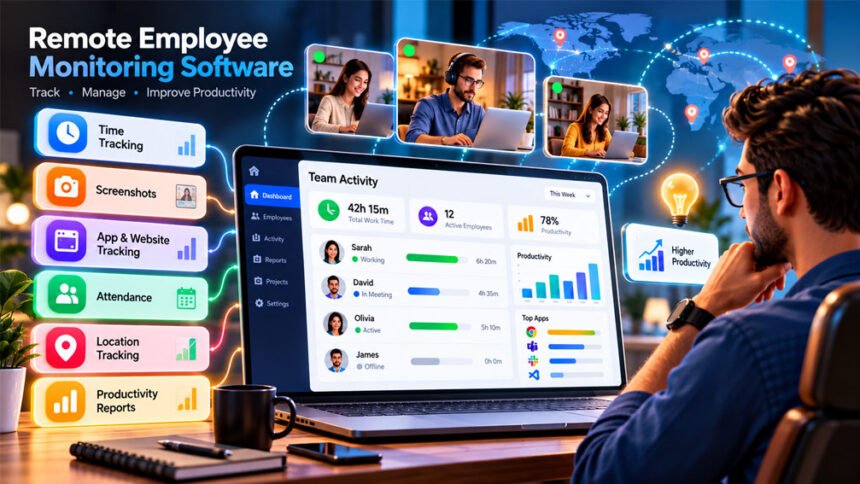
Remote employee monitoring software helps companies track the work of remote employees. It can track work hours, attendance, computer activity, apps, websites, projects, and other work details.
Companies use these tools to manage remote and hybrid teams. Some only need simple time tracking. Others need screenshots, productivity reports, GPS, or shift tracking.
This guide explains how remote employee monitoring software works, its main features, costs, benefits, problems, privacy risks, and legal rules.
What Is Remote Employee Monitoring Software?
Remote employee monitoring software is a tool that tracks employee work activity. It helps managers understand how remote employees use their work time.
Basic software may only track work hours and projects. More advanced software can track apps, websites, idle time, screenshots, attendance, and other computer activity.
There are several types of monitoring tools.
Time tracking software records how long employees work and how much time they spend on tasks.
Productivity monitoring software tracks work activity, such as apps, websites, active time, and idle time.
Workforce analytics software helps companies understand work patterns, workloads, and how teams use their time.
Security monitoring software helps companies watch for unusual or risky activity.
One tool may include several of these features.
These tools are commonly used by remote and hybrid teams. Agencies, BPOs, technology companies, customer support teams, consultants, finance companies, contractors, and field teams may also use them.
Employee monitoring does not always mean detailed surveillance. Some companies only use simple time and attendance tracking.
How Does Remote Employee Monitoring Software Work?
Most remote employee monitoring software uses an app installed on the employee’s computer.
Some tools also work through web browsers or mobile apps.
The software collects the work information chosen by the company. This may include work hours, apps, websites, screenshots, projects, attendance, and activity levels.
This information is usually shown in an online dashboard. Managers can view reports for employees, teams, projects, tasks, dates, or shifts.
Cloud-based tools normally send the data to online servers. Approved users can then view it from their dashboard.
Some tools can also collect certain data while the internet is offline. The data is uploaded when the internet connection returns.
Companies can normally choose which features they want to use. They do not have to turn on every monitoring feature.
Manual vs Automatic Tracking
With manual tracking, employees start and stop the timer themselves. They may also select the project or task they are working on.
This gives employees more control. However, they may sometimes forget to start or stop the timer.
Automatic tracking needs less manual work. It may start based on a schedule, login, computer activity, or company settings.
Some monitoring apps can also run in the background. This does not always mean the monitoring is secret. Employees may know the software is running even when they cannot see it on the screen.
Companies should clearly decide when monitoring starts and stops, especially when employees work from home or use personal computers.
Tracking Remote and Night Shifts
Shift tracking is useful for businesses that work at night or operate 24 hours a day.
For example, an employee may start work at 10 PM on Monday and finish at 7 AM on Tuesday. Some tools may split this shift between two days.
A tool with good shift tracking can keep the full work period under one shift.
This makes attendance, payroll, and timesheets easier to manage.
Night-shift tracking can be useful for BPOs, support teams, logistics companies, healthcare businesses, and international teams.
Companies should check how a tool handles night shifts and different time zones before choosing it.
Main Features of Remote Employee Monitoring Software
Different monitoring tools offer different features. Companies should only use the features they actually need.
Time Tracking and Timesheets
Time tracking records how long employees work.
It can show when an employee starts and stops work. It can also show how much time they spend on different tasks or projects.
Many tools create digital timesheets from this information.
Employees or managers may be able to check and correct these timesheets.
Time tracking is useful for project planning, client billing, and payroll. Companies still need to check breaks, overtime, and other pay rules.
Attendance, Breaks, and Idle Time
Attendance tracking records when employees start and finish work.
Some tools can also track breaks, absences, schedules, and overtime.
Idle tracking checks when there is no keyboard or mouse activity.
However, idle time does not always mean an employee is not working. Someone may be reading, planning, thinking, or talking on a work call.
Managers should therefore look at the full situation before judging idle time.
Screenshots and Screen Recording
Some monitoring software can take screenshots of an employee’s screen.
Screenshots may be taken at fixed or random times. Some tools also allow screenshots to be blurred.
More advanced software may offer screen recording or live screen viewing.
These features can show more details about computer activity. However, they also create privacy risks.
Screenshots may capture passwords, private messages, customer information, or financial details.
Companies should clearly decide when screenshots are taken, who can see them, and how long they are stored.
Keyboard and Mouse Activity
Some tools measure keyboard and mouse activity.
This can show whether the computer is being actively used.
However, activity tracking is not always the same as keylogging.
Activity tracking may only count keyboard use. Keylogging records the actual keys that a person types.
High keyboard or mouse activity does not always mean someone is productive. Low activity also does not always mean poor work.
App and Website Monitoring
App monitoring shows which programs employees use during work.
Website monitoring can show which websites they visit and how much time they spend on them.
Some tools label apps and websites as productive, unproductive, or neutral.
These labels should match the employee’s job.
For example, social media may not be useful for an accountant, but it may be important for a social media manager.
Productivity Analytics
Productivity analytics turns work activity into reports.
Reports may show active time, focus time, app use, meeting time, workloads, or productivity scores.
Some tools also show when teams are most active.
These reports can help managers understand work patterns and find problems.
However, a productivity score cannot fully show how well an employee is working. Work quality and results are also important.
Projects and Tasks
Many monitoring tools let employees connect their time to projects and tasks.
For example, an employee may choose a project before starting a timer.
Managers can then see how much time was spent on that project.
This can help with project planning, client billing, workloads, and future estimates.
Live Dashboards, Alerts, and Reports
A live dashboard shows current employee activity.
Depending on the software, managers may see whether someone is active, idle, offline, or in a meeting.
Some tools also provide daily or weekly reports.
Alerts can tell managers about unusual activity or other important events.
Managers should check these alerts before making decisions. An unusual activity report does not always mean someone has done something wrong.
GPS and Location Tracking
Some monitoring tools offer GPS tracking.
This can be useful for delivery workers, sales teams, technicians, and other field employees.
GPS information may also be connected to attendance or work hours.
Location data is sensitive. Companies should have a clear reason for tracking it and should explain when GPS tracking is active.
Supported Devices and Operating Systems
Most remote employee monitoring software supports Windows and macOS.
Some tools also support Linux.
Android and iOS apps are also available for some products. Mobile apps often focus on time tracking, attendance, timesheets, and GPS.
They may not offer all the features available on desktop computers.
Some services also work through web browsers.
Chromebook support depends on the software.
Companies should check exactly which features work on each device before choosing a tool.
System Requirements and Permissions
Every monitoring tool has its own system requirements.
Companies should check supported operating systems, browsers, internet requirements, storage, memory, and security software.
Some features need special permissions.
For example, macOS may require screen-recording or accessibility permission.
Linux support may also depend on the Linux version.
Operating system updates can sometimes affect monitoring apps.
Always check the latest system requirements from the software provider before installation.
Remote Employee Monitoring Software Costs
Prices depend on the software, number of employees, features, storage, support, and billing plan.
Many providers charge per user per month. This means the total price increases when more employees are added.
Some providers offer flat-rate pricing. A company pays one price for a certain number of employees.
Large companies may receive custom enterprise prices.
Some advanced features may cost extra. These can include screen recording, extra screenshot storage, GPS tracking, advanced reports, and longer data history.
Companies should look at the full cost instead of only the starting price.
Free Plans vs Free Trials
A free plan and a free trial are different.
A free trial lets you use the software for a limited time. You normally need to pay when the trial ends.
A free plan can usually be used for a longer time without payment.
However, free plans often have limits. They may limit employees, reports, screenshots, storage, integrations, or data history.
Some tools may offer unlimited users but still limit other features.
Always check exactly what the free plan includes.
Examples of Monitoring Software and Pricing
There are many employee monitoring tools available.
Hubstaff offers time tracking, screenshots, activity tracking, app and website monitoring, scheduling, and project reports.
Time Doctor offers time tracking, task tracking, screenshots, attendance, app tracking, and productivity reports.
ActivTrak focuses on workforce analytics and productivity information. It has offered both free and paid options.
Insightful offers app and website monitoring, screenshots, productivity reports, and workforce analytics.
DeskTime offers automatic time tracking and app and website tracking.
Clockify mainly focuses on time and project tracking. It offers a free option, while some advanced features require paid plans.
Other tools include Time Champ, Horaflow, and EmpTrakr. Available information describes features such as time tracking, screenshots, attendance, and productivity reports. Some also advertise free or flat-rate plans.
Prices and features can change. Always check the latest plans before buying.
Benefits of Remote Employee Monitoring Software
Remote employee monitoring software can make remote teams easier to manage.
It can give businesses better records of employee work hours and reduce the need for manual timesheets.
Project reports can show how long different jobs take. This can help companies plan projects and set better deadlines.
Time records can also help agencies with client billing and businesses with payroll.
Monitoring reports may also help managers find workload problems.
Other possible benefits include:
- Better attendance records
- Easier schedule management
- Better project records
- Better understanding of app use
- Help with client billing
- Finding workflow problems
- Support for teams in different time zones
- Possible detection of unusual activity
However, monitoring software does not automatically improve productivity. The results depend on how the company uses it.
Drawbacks and Limitations
Remote employee monitoring software also has some problems.
Privacy is a major concern. Screenshots, website records, location data, and other information may collect more data than a company needs.
This can be a bigger problem when employees use personal computers.
Too much monitoring may also reduce trust. Employees may feel uncomfortable if they believe everything they do is being watched.
Computer activity is also not a perfect way to measure productivity.
Someone may be reading, planning, talking to a client, or thinking about a problem while showing little computer activity.
Automatic productivity labels can also be wrong.
Cost is another issue. Per-user plans can become expensive for large teams. Advanced features may also cost extra.
Technical problems can happen because of poor internet, missing permissions, software conflicts, or operating system updates.
Monitoring data should not be the only way to judge an employee’s work.
Privacy and Data Security
Employee monitoring software can collect sensitive information.
This may include work hours, apps, websites, screenshots, recordings, device details, projects, activity levels, and location.
Some tools may record actual keystrokes. Others only measure keyboard activity.
Screenshots can also capture private information, such as passwords, messages, customer details, or financial information.
Personal computers need extra care because they may contain private photos, files, accounts, and messages.
Companies should keep personal and work activity separate where possible.
They should also check how the software provider protects stored data.
Useful security features include encryption, two-factor authentication, access controls, audit logs, and data deletion options.
Only approved people should be able to see employee monitoring data.
Companies should also decide how long they need to keep the information.
A clear monitoring policy should explain what is tracked, why it is tracked, when tracking happens, who can see the data, and how long it is stored.
Is Remote Employee Monitoring Software Legal?
Employee monitoring laws are different in different places.
The rules may depend on the country, state, type of monitoring, information collected, and reason for monitoring.
Simply telling employees about monitoring does not automatically make every type of monitoring legal.
Companies should have a clear reason for monitoring and avoid collecting information they do not need.
Secret monitoring may have stricter rules.
United States
Employee monitoring in the United States can be covered by federal and state laws.
Rules can depend on what is being monitored and whether employees use company or personal devices.
Some states have rules about telling employees that monitoring is taking place.
Companies with workers in different states should check the rules for each location.
United Kingdom
UK businesses need to consider data protection rules when monitoring employees.
Monitoring should have a clear reason and should not collect more information than needed.
Workers should normally know that monitoring is taking place.
Companies should also think about who can see the information and how long it is stored.
Some types of monitoring may require a Data Protection Impact Assessment.
European Union
The GDPR is important when employee monitoring involves personal data in the European Union.
Companies should have a legal reason for using the data. They should also be clear about what they collect and protect the information properly.
Individual EU countries may have extra employment and privacy rules.
Canada and Other Countries
Canada also has privacy rules that can affect workplace monitoring.
Other countries have their own employment and privacy laws.
This is important for international teams because employees may work in different countries.
Companies should check the laws that apply to each worker before starting monitoring.
Can Employers Monitor Employees Without Their Knowledge?
Some monitoring software can run quietly in the background.
This does not always mean monitoring is secret. Employees may already know the software is running.
Secret monitoring means employees do not know they are being monitored.
Just because software can work secretly does not mean an employer is legally allowed to use it that way.
Some places may allow secret monitoring only in special cases, such as investigating serious wrongdoing.
For normal work, companies should clearly explain how employees are monitored.
How to Introduce Monitoring Without Damaging Employee Trust
Companies should explain monitoring before they start using it.
Employees should know what is tracked and why.
They should also know what is not tracked.
A monitoring policy should explain whether the software tracks work hours, screenshots, apps, websites, location, or computer activity.
It should also explain when monitoring starts and stops.
Employees should know who can see their data and how long it is stored.
Training can help employees understand how timers, breaks, screenshots, and timesheets work.
Where possible, employees should be able to check their own records and report mistakes.
Managers should not judge workers only by computer activity. Work quality, completed tasks, deadlines, and communication are also important.
How to Choose Remote Employee Monitoring Software
First, decide why your business needs the software.
If you only need timesheets, you may not need screenshots or website monitoring.
If you have field workers, GPS and mobile tracking may be more useful.
If your team works at night, check night-shift and time-zone support.
Also check which devices and operating systems are supported.
Privacy controls are important. Check whether screenshots can be turned off or blurred and whether monitoring can be limited to work hours.
Look at security features and who can access the data.
You should also check the full price. Look at monthly and yearly prices, user limits, paid add-ons, storage, and advanced features.
A free trial can help you test the software before using it across the whole company.
Important Questions to Ask Before Buying
Ask these questions before choosing a tool:
- What does the software track?
- How many employees can use it?
- Can tracking stop after work?
- Are screenshots optional?
- Does it record actual keystrokes?
- Which devices does it support?
- Can it handle night shifts?
- Does it support different time zones?
- How long is data stored?
- Who can see employee data?
- Can employees check their records?
- Does it work offline?
- What integrations are available?
- Which features cost extra?
- Is the free version permanent or a trial?
- What happens to the data after closing the account?
Common Problems and Troubleshooting
Time Is Not Being Recorded
Check that the timer or automatic tracking is turned on.
Also make sure the employee is using the correct account, project, and task.
Timer Does Not Start Automatically
Check the automatic tracking settings and work schedule.
The software may also need extra computer permissions.
Screenshots Are Missing
Check whether screenshots are turned on and included in the plan.
The computer may also need screen-recording permission.
Activity Levels Look Incorrect
Low activity does not always mean someone is not working.
Meetings, reading, research, planning, and phone calls can all show low computer activity.
Apps or Websites Are Classified Incorrectly
Check the productivity categories.
Change the category if the app or website is needed for the employee’s job.
Working Hours Appear on the Wrong Day
Check the employee’s time zone.
For night workers, also check how the software handles shifts that continue after midnight.
App or Website Records Are Missing
Check that app and website tracking is turned on.
Browser settings, permissions, or plan limits may also cause this problem.
Data Is Not Syncing
Check the internet connection.
If the software supports offline tracking, the data may appear when the internet returns.
Restarting or updating the app may also help.
Desktop App Does Not Open
Make sure the operating system is supported.
Also check for software updates, missing permissions, or security software problems.
Employee Cannot Access Reports
Check the employee’s account permissions.
Some reports may only be available to managers.
Payroll Hours Do Not Match Timesheets
Check breaks, overtime, manual changes, approvals, and time-zone settings.
The payroll system may also calculate time differently.
Monitoring Continues Unexpectedly
Check automatic schedules and background tracking settings.
If tracking continues after work, report the problem to the company administrator.
Best Practices for Remote Employee Monitoring
For Employers
Have a clear reason for monitoring employees.
Only use the features you actually need.
Tell employees what is tracked, why it is tracked, and when monitoring happens.
Protect employee data and only allow approved people to see it.
Do not keep monitoring records longer than needed.
Remember that idle time and keyboard activity do not tell the full story.
Use monitoring data together with work quality, completed tasks, and human judgment.
Review your monitoring settings regularly.
For Employees
Read your company’s monitoring policy.
Understand what is being tracked and when tracking starts and stops.
Use the correct project or task when tracking time.
Check your timesheets for mistakes.
If you use your own computer, ask whether monitoring continues outside work hours.
Report wrong records or technical problems.
Bottom Line
Remote employee monitoring software helps businesses track remote work, attendance, projects, computer activity, and work hours.
Some businesses only need simple time tracking. Others may need screenshots, app monitoring, GPS, shift tracking, or security tools.
Companies should consider price, features, device support, privacy, security, and local laws before choosing software.
Computer activity does not always show real productivity. The best approach is to track only the information the business needs and clearly explain the process to employees.
Frequently Asked Questions
What is remote employee monitoring software?
It is software that helps companies track remote employees’ work hours, attendance, apps, websites, and other work activity.
How does remote employee monitoring software work?
It collects work data from an employee’s device. Managers can view this information in reports or a dashboard.
Can employee monitoring software see my screen?
Yes, some tools can take screenshots or record the screen. It depends on the software and its settings.
Does employee monitoring software record keystrokes?
Some tools can record keystrokes, while others only measure keyboard activity without recording what you type.
Is remote employee monitoring software legal?
It can be legal, but the rules are different in each country or region. Companies must follow local privacy and employment laws.
How much does remote employee monitoring software cost?
Some tools are free or offer free trials. Paid tools may charge per user, per month, or use a flat price.
Can remote employee monitoring software track employees after work?
Some tools can keep tracking if they are set that way. Companies should clearly set work hours and follow privacy laws.
What should I look for in remote employee monitoring software?
Check the features, price, device support, privacy, security, and user limits. Choose a tool that fits your team’s needs.
More To Explore:
Software Development Staff Augmentation: Complete Guide for Businesses