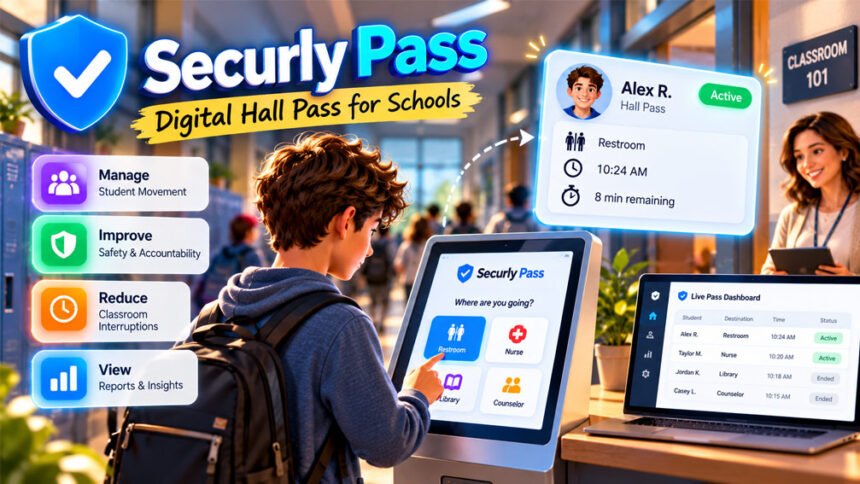
Securly Pass is a digital hall pass system for K-12 schools. It replaces paper hall passes with digital passes that teachers and school staff can manage online.
Schools can use it to manage students in hallways, keep pass records, and reduce class interruptions. This guide explains how Securly Pass works, its main features, benefits, privacy concerns, pricing, and limitations.
What Is Securly Pass?
Securly Pass is an electronic hall pass system made by Securly. It is mainly designed for K-12 schools and school districts.
Instead of writing a paper pass, a school can create a digital pass. The system can record where a student wants to go and how long the pass has been active.
Securly Pass is more than a simple bathroom pass system. Depending on the school’s setup, it can also help manage tardies, appointments, early dismissals, visitors, and reports.
Students can request passes. Teachers can approve and monitor them. Office staff can manage visitors and early dismissals. School administrators can review records and reports.
Securly Pass is not normally purchased by individual students or parents. Schools and districts get access from Securly and set up the system for their users.
Older online information may also connect Securly Pass with eHallPass. However, the exact history between these names is not fully clear from the information reviewed.
How Does Securly Pass Work?
A student first requests a pass to leave the classroom. The student chooses a destination, such as a restroom, library, nurse’s office, or counselor’s office.
The teacher can then approve the request. Schools can also set up some passes so students do not need to wait for manual approval every time.
Once the pass starts, authorized school staff can see it on the Securly Pass dashboard. They can see the destination and how long the pass has been active.
Schools can also set rules for pass use and time limits.
Students do not always need their own devices. A school can provide a shared kiosk. A teacher can also create a pass for a student.
Does Securly Pass Track Students’ Location?
Securly Pass does not use GPS to track a student’s exact physical location, according to Securly.
Instead, it records information about the student’s pass. This can include the destination, time, approval, and pass status.
For example, if a student gets a pass to go to the library, the system can show that the student’s destination is the library. It cannot confirm the student’s exact physical position inside the school.
If a student leaves class without creating a pass, Securly Pass does not automatically know where that student is.
This means Securly Pass tracks pass activity and expected destinations, not live GPS locations.
Main Features of Securly Pass
Securly Pass has several tools for managing student passes and movement. The exact features available may depend on the school’s setup and license.
Live Hall Pass Dashboard
The dashboard shows active student passes in one place.
Teachers and authorized staff can see which students have active passes, where they are expected to go, and how long they have been out.
This can also help staff notice passes that have been active for too long.
Pass Limits and Restrictions
Schools can limit how often students use passes.
Limits can be set for one student, a group, a grade, or the whole school.
The school decides these rules. Securly does not set one pass limit for every school.
Schools can also give extra passes to students when needed.
Location and Capacity Limits
Schools can control which places students can select.
For example, a school may stop new passes to a room if it is closed or already has too many students.
Here, “location” means a destination added to the system. It does not mean GPS location tracking.
Contact Controls
Contact controls can stop selected students from having active passes at the same time.
A school may use this feature to prevent certain students from meeting during class time.
The school decides which students need this restriction.
Auto Pass
Auto Pass can allow some students to start a pass without waiting for the teacher to manually approve every request.
Teachers can still use manual approval when needed.
This can make simple pass requests quicker and cause fewer classroom interruptions.
Appointment Pass
Appointment Pass is used for planned meetings.
For example, a counselor can schedule a student appointment. The system can send reminders about the meeting.
Students without a device may not receive an in-app reminder. A teacher or staff member may need to tell them when it is time to leave.
Proxy Pass and Pass Kiosk
Securly Pass also has options for students who do not have their own devices.
A Proxy Pass, sometimes called a Teacher Pass, lets a teacher or staff member create a pass for the student.
A Pass Kiosk is a shared device students can use. A school could place one in a library, cafeteria, gym, or front office.
Depending on the setup, students may use a student number, school ID, barcode, QR code, or account information to identify themselves.
Analytics and Reports
Securly Pass keeps digital pass records that schools can review.
Administrators can look at pass use, popular destinations, tardy patterns, and other information. District leaders may also be able to compare information between different schools.
However, the data needs to be understood carefully. A student using many passes does not always mean that the student is breaking rules.
Visitor Management, Tardies, and Early Dismissals
Securly Pass is not only for hall or bathroom passes.
It can also help schools manage tardies, visitors, and early dismissals.
Securly says Visitor Management is included with Pass licenses. It can help schools check people entering the building and compare them with approved contact information.
In the United States, Securly says its visitor system can also check the national sex offender registry. This feature may not work the same way outside the U.S.
The system can also help staff check whether a student is being picked up by an approved adult.
Schools can use supported iPads or Android tablets for visitor check-in. Extra equipment may be needed if a school wants to print visitor badges.
Securly Pass Integrations and Device Support
Securly Pass is mainly web-based. Schools can use it through a supported web browser.
Mobile apps are also available for supported users.
Schools can use shared devices too. For example, an iPad or Chromebook can be used as a Pass Kiosk.
Securly Pass can connect with a school’s Student Information System (SIS). This helps schools keep student and staff records updated.
Supported rostering methods mentioned in Securly information include Securly Sync, OneRoster, PowerSchool, ClassLink, Clever, CSV files, and SFTP. Manual account setup may also be possible.
Single sign-on options include Google, Microsoft, ClassLink, and Clever.
Schools should check Securly’s latest system requirements before setting it up because supported apps, browsers, and integrations can change.
Benefits of Securly Pass
Securly Pass can make hall pass management easier by putting student passes into one digital system.
However, many performance claims about the service come from Securly itself rather than independent studies.
Better Student Accountability
Securly Pass keeps a record when a student gets a pass.
School staff can see that the student has permission to leave class, where the student plans to go, and how long the pass has been active.
This provides more information than a normal paper pass.
Better Hallway Management
Schools can control how many passes are active and limit access to busy places.
Contact controls can also stop selected students from being out of class at the same time.
These features may help schools reduce unnecessary hallway traffic.
Fewer Classroom Interruptions
Students can make digital requests instead of asking the teacher to write a paper pass.
Auto Pass can also reduce the number of requests teachers need to approve manually.
Securly has reported benefits related to more teaching time, but these figures mainly come from the company and should not be treated as independent research.
Useful School Data
Schools can review digital pass records to understand how the system is being used.
They can see popular destinations, busy times, frequent pass use, and tardy patterns.
This information should always be considered with context. Frequent pass use does not automatically mean a student is doing something wrong.
Help During Safety Situations
During an emergency, staff can check active passes to see which students were expected to be outside their classrooms.
This can provide useful information, but it should not replace headcounts or normal emergency procedures.
Securly Pass does not show the student’s exact GPS location.
Consistent School Rules
Schools can use common pass rules across different classrooms.
This can make rules more consistent than a system where every teacher uses a different paper-pass policy.
Schools should still allow reasonable exceptions when students have special or legitimate needs.
Securly Pass vs. Traditional Paper Hall Passes
Both systems allow students to leave class with permission, but they work differently.
Paper passes are simple and cheap. They do not need devices, internet access, accounts, or software.
Securly Pass provides more information. It keeps digital records and allows schools to set limits and review reports.
| Feature | Paper Hall Pass | Securly Pass |
|---|---|---|
| Pass records | Limited or manual | Automatic |
| Destination | Usually shown | Yes |
| Pass time | Usually manual | Recorded digitally |
| Pass limits | Teacher controlled | Configurable |
| Reports | No built-in reports | Yes |
| Internet needed | No | Yes |
| Data collected | Very little | More |
| Setup | Very simple | Required |
| Cost | Very low | License required |
A large school with busy hallways may find a digital system more useful. A small school may be able to manage student movement with simpler methods.
Securly Pass Privacy and Student Data
Securly Pass keeps records about student pass activity. This makes privacy an important issue.
Pass records may include information such as the student’s destination, time, and approval. Account information may also be collected when schools add students to the system.
Securly says Pass does not use GPS to follow students.
The company also describes several security measures. These include encrypted roster transfers, single sign-on, a web application firewall, session controls, and adult PIN protection.
Securly states that Pass follows FERPA and COPPA requirements. The company also provides GDPR information and says the service meets WCAG 2.1 accessibility guidelines.
These are statements made by Securly. They should not be confused with an independent security audit.
Some privacy details may also depend on the school’s contract and settings. For example, the public information reviewed does not clearly give one standard period for how long every pass record is stored.
Parents and schools may want to ask:
- How long are pass records stored?
- Who can see a student’s records?
- Who can delete them?
- Can parents request these records?
- Is student information shared outside the school?
- What happens to the data when a student leaves?
These questions are important because records of restroom, nurse, or counselor visits can be sensitive.
Limitations and Possible Drawbacks
Securly Pass has useful tools, but it also has some limitations.
Dependence on Technology
The system needs working technology and internet access.
Weak Wi-Fi, device problems, account issues, or service outages can cause problems. Schools should have a backup system for these situations.
Students Can Still Avoid the System
Securly Pass cannot physically stop a student from leaving class.
If a student leaves without creating a pass, the system cannot automatically find that student.
Normal school supervision is still needed.
Rules Can Be Too Strict
Pass limits may not work for every student.
Some students may need to visit the restroom, nurse, counselor, or another location more often for legitimate reasons.
Schools should have a simple way to make exceptions when needed.
Privacy Concerns
Digital passes create more student records than paper passes.
Some students and parents may be uncomfortable with schools keeping a history of restroom or other visits.
Schools should clearly explain what information is collected and how it is used.
Training and Adoption
Teachers, students, office staff, substitutes, and administrators need to know how to use the system.
If only some teachers use it, school records may be incomplete.
Schools may need to provide training when Securly Pass is introduced and when new staff arrive.
Limited Independent Evidence
Many positive claims about Securly Pass come from Securly surveys, case studies, and customer comments.
These can be useful examples, but they are not the same as independent research.
Schools should consider their own needs before deciding whether the system is useful.
Common Securly Pass Problems and Setup Challenges
Schools may face some problems when setting up or using Securly Pass.
Missing Students or Staff
New students or staff may not appear immediately after school records are updated.
Administrators should check the SIS or roster connection first. They should also make sure the person’s account and role are correct.
If the problem continues, the school may need to contact Securly support.
Sign-In Problems
Login problems can happen because of incorrect account details or single sign-on settings.
Users should use the login method chosen by their school. This may be Google, Microsoft, Clever, ClassLink, or another supported method.
Incorrect User Roles
A wrong account role may stop someone from seeing or using the correct tools.
Administrators should check the user’s role in the school roster and Securly settings.
Students Without Devices
Students do not always need their own devices.
A school can provide a Pass Kiosk or a teacher can create a Proxy Pass.
Weak Wi-Fi
Poor internet access can make a web-based pass system difficult to use.
Schools should test Wi-Fi in classrooms and other important areas. They should also have a backup plan for internet outages.
Pass Limits Are Too Strict
Schools may find that their first pass limits are too strict.
Administrators should review pass records and teacher feedback. Students with genuine needs should be given reasonable exceptions.
Teachers Do Not Use the System Consistently
Securly Pass is less useful if only some teachers use it.
Schools should provide clear rules and basic training. New teachers and substitutes should also learn how the system works.
Appointment Notifications Are Missed
Students without devices may not see Appointment Pass notifications.
Teachers or staff may need to remind these students when it is time for their appointment.
Securly Pass Pricing
Securly does not publicly list standard Pass prices in the information reviewed.
Schools and districts usually need to contact Securly for a demo and price quote.
The final cost may depend on the school’s or district’s agreement.
Securly says Visitor Management is included with Pass licenses.
The mobile app may be free to download, but this does not mean the full Securly Pass service is free. A user still needs access through a school that uses the service.
Schools should ask what is included in their quote. They should also consider extra costs for training, kiosks, visitor check-in devices, and badge printers if these are needed.
Who Should Use Securly Pass?
Securly Pass may work well for schools that have many students moving through hallways during the day.
Middle schools and high schools may find the live dashboard and pass limits useful. School districts may also use reports to manage rules across several schools.
Schools already using other Securly products may also find the integration useful.
Elementary schools can use the system too. Teachers can create passes for younger students who do not have devices.
Securly Pass may be less useful for very small schools with little hallway traffic. Schools with poor internet or limited technology support should also think carefully before using it.
Schools should also consider how students and parents feel about keeping digital pass records.
Tips for Schools Using Securly Pass
Schools should start with simple rules and change them only when needed.
- Test the system with a small group before using it across the whole school.
- Train teachers and office staff.
- Tell students and parents what information is recorded.
- Create exceptions for students with genuine needs.
- Do not assume frequent pass use means bad behavior.
- Keep a backup plan for internet or system problems.
- Review reports before making limits stricter.
- Check which staff members can access student records.
- Create clear rules for storing and deleting data.
- Review the system after it has been used for some time.
Technology should support school rules. It should not replace good judgment.
Securly Pass Alternatives
Schools have several alternatives. The best choice depends on whether the school needs hall pass management, visitor security, emergency communication, or a simple low-cost system.
Traditional Paper Hall Passes
Paper passes are the simplest option.
They cost very little, need no internet connection, and collect almost no digital student data.
However, they do not provide automatic records, reports, or a live view of student passes.
Paper passes may still work well for smaller schools.
Other Electronic Hall Pass Systems
Other companies also provide digital hall pass systems.
They may offer digital requests, timers, limits, destination controls, and reports.
Schools should compare current prices, privacy policies, SIS support, device requirements, and features before choosing one.
Raptor Visitor Management
Raptor focuses mainly on managing school visitors.
It can help schools check visitors, keep visitor records, and manage front-office security.
It may be useful when visitor security is the school’s main concern. However, it does not replace every student hall pass feature offered by Securly Pass.
CrisisGo
CrisisGo focuses more on emergency communication and school safety.
It provides tools related to alerts, emergency response, and safety communication.
It may suit schools mainly looking for emergency tools rather than digital hall pass management.
Safety Drills and Emergency Procedures
Schools should not depend only on technology for safety.
Regular drills, clear emergency plans, staff training, and reliable communication are still important.
These methods do not replace digital hall passes, but they cover safety needs that a pass system cannot handle alone.
Is Securly Pass Worth It?
Securly Pass may be useful for schools that need better control over student passes and hallway movement.
Its main benefits are digital pass records, common school rules, destination controls, reports, and one dashboard for active passes.
However, schools also need to consider the cost, training, internet requirements, and student privacy.
A large school with busy hallways may get more value from Securly Pass than a small school where paper passes already work well.
Before buying, schools should request a current demo and price quote. They should also ask about data storage, staff access, integrations, privacy, and technical requirements.
Bottom Line
Securly Pass is a digital system for managing hall passes and student movement in schools.
It offers tools such as active pass dashboards, pass limits, destination controls, appointments, kiosks, reports, visitor management, and school-system integrations.
According to Securly, the system does not use GPS to continuously track students. It records pass activity and where a student is expected to go.
Securly Pass may be useful for schools that need better hallway management and digital records. However, schools should also consider its cost, technology needs, and privacy concerns before using it.
Frequently Asked Questions
What is Securly Pass used for?
Securly Pass helps schools manage digital hall passes. It also helps with student movement, tardies, appointments, and visitors.
Does Securly Pass track your location?
No. Securly says it does not use GPS. It only records pass details like destination, time, and status.
Can students use Securly Pass without a device?
Yes. Teachers can create passes for students, or students can use a shared Pass Kiosk.
Can Securly Pass limit bathroom passes?
Yes. Schools can set limits on bathroom and other passes. They can also make exceptions when needed.
Is Securly Pass free?
No standard free plan is confirmed. Schools and districts need to contact Securly for pricing.
Can parents see Securly Pass history?
This is not clearly confirmed. Parents should ask their school if they can view or request pass records.
Is Securly Pass safe for student privacy?
Securly says it uses security measures to protect student data. Schools should also have clear rules about who can see and use the records.
Does Securly Pass work if a student does not create a pass?
No. If a student leaves without a pass, Securly Pass cannot automatically find or track them.
More To Explore:
Geekzilla.io Review: Features, Tech Content, Benefits, and Limitations