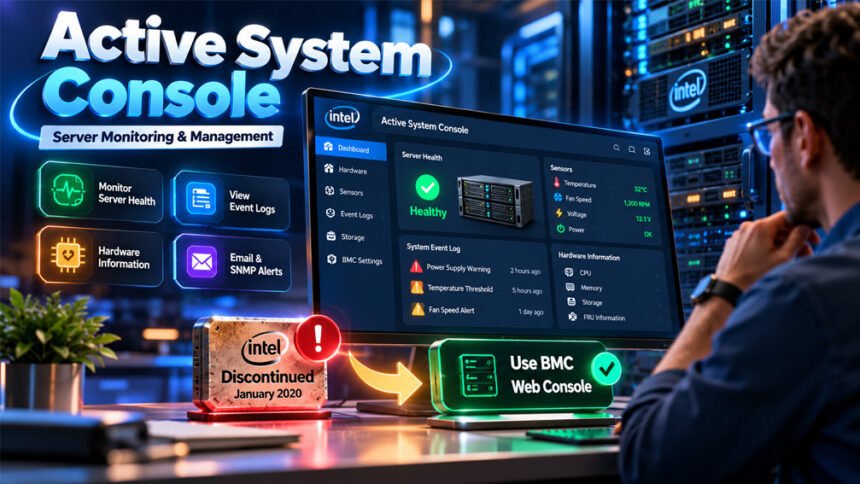
Active System Console is a tool used to check server hardware and system health. It can show hardware problems, sensor data, system events, and other useful server information.
One well-known version was Intel Active System Console (IASC). Intel made it for supported Intel server systems. However, Intel has now discontinued IASC.
This guide explains what Active System Console is, how it worked, its main features, security risks, common problems, and modern alternatives.
What Is Active System Console?
Active System Console is a tool for checking and managing server hardware. It gives administrators one place to see important information about a server.
Intel Active System Console could show server health, hardware sensors, system events, installed parts, and some management settings. This helped administrators find hardware problems without checking every part by hand.
The name Active System Console can also refer to other products. For example, Skyhigh Security uses the same name for a tool on some Secure Web Gateway appliances.
For this reason, users should first check which Active System Console they are using.
It is also different from the Windows Services Console. Windows services.msc is used to manage Windows services. Intel Active System Console was mainly made for monitoring server hardware.
What Is Intel Active System Console (IASC)?
Intel Active System Console (IASC) was a server monitoring tool made by Intel. It worked with supported Intel server systems.
Its main purpose was to put important hardware information in one dashboard.
Administrators could check processors, memory, storage, sensors, system events, and other hardware information without opening the physical server.
It was also useful for troubleshooting. For example, a warning could help an administrator find a cooling, power, storage, or hardware problem.
IASC did not work with every computer or server. Its features depended on the server model, hardware, firmware, operating system, and IASC version.
Intel ended support for Active System Console in January 2020. It is now an old or legacy product.
How Intel Active System Console Worked
Intel Active System Console was installed on a compatible server.
It collected information from the server’s hardware sensors and management components. It then showed this information in a web-based dashboard.
Administrators could access the dashboard from another computer if they had the correct network access. Historical information about IASC mentions the server’s IP address, the /asc/ path, and port 9393.
After opening the dashboard, administrators could check hardware health and system events.
If a warning appeared, they could look at sensor readings and logs to help find the problem.
The exact features were different between servers. They depended on the hardware, firmware, operating environment, and IASC version.
Main Features of Active System Console
Intel Active System Console offered several tools for checking server hardware and finding problems.
Server Health and Hardware Monitoring
IASC could show the health of supported server components.
It could also display information from hardware sensors. Depending on the server, this could include temperature, fans, cooling, voltage, and other readings.
These readings could help administrators notice possible problems early.
For example, a high temperature could point to a cooling problem. A power warning could show that a power supply needs attention.
However, IASC could not predict or prevent every hardware failure.
System Event Logs and Diagnostics
IASC could show the System Event Log (SEL).
This log records hardware events and errors detected by the server.
Administrators could check these events when trying to understand a hardware problem. For example, an event might show a problem with cooling, power, sensors, or another component.
IASC could also provide diagnostic information and reports to help with troubleshooting.
Hardware and Asset Information
IASC could show information about hardware installed inside the server.
This could include processors, memory, storage, hardware inventory, and Field Replaceable Unit (FRU) information.
FRU information helps identify server parts that can be replaced during maintenance.
Having this information in one dashboard made it easier to check the server without opening it just to identify its parts.
Alerts and Notifications
Intel Active System Console supported alerts for some server events.
It could use email and SNMP alerts on supported systems.
These alerts could tell administrators when the server detected a problem. This meant they did not need to keep watching the dashboard all the time.
An alert did not fix the problem. Administrators still had to check the server and find the cause.
BMC and Management Settings
IASC could also provide access to some Baseboard Management Controller (BMC) settings.
A BMC is a hardware management component found in many servers. It helps administrators monitor and manage server hardware.
The available settings depended on the server and its configuration.
Active System Console vs. BMC
Intel Active System Console and a BMC are not the same thing.
IASC was software installed on a supported server. A BMC is a hardware-based management controller built into or provided with a server.
A BMC can often work even when the main operating system has a problem. This is called out-of-band management.
Depending on the server, a BMC may provide sensor readings, hardware logs, remote console access, power controls, firmware tools, and other settings.
After Intel discontinued IASC, the company recommended using the integrated BMC web console on supported server systems.
BMC features are different between server models. Users should always check the documentation for their exact server.
Is Intel Active System Console Still Supported?
No. Intel Active System Console is no longer supported.
Intel ended Active System Console and Intel Multi-Server Manager in January 2020.
IASC no longer receives normal feature updates or security updates from Intel. Intel recommends that users stop using the software.
An old IASC installation may still open and work. However, this does not mean it is secure or supported.
Users should also be careful when searching for an Intel Active System Console download. Old installation files from unknown websites may be unsafe.
If IASC is still installed on a server, check the exact server model and look for a supported management option. On applicable Intel servers, the integrated BMC web console is the main replacement.
Intel Active System Console Security
Security is important because server management tools can access important hardware information and settings.
The biggest security problem with IASC today is that Intel no longer maintains it. This means new security problems may not receive fixes.
CVE-2019-11120 and Version 8.0 Build 24
Intel reported a security issue called CVE-2019-11120.
The problem affected the IASC installer in versions before 8.0 Build 24. Under certain conditions, someone with local access could possibly use the weakness to gain higher system privileges.
Version 8.0 Build 24 addressed this particular issue.
However, Build 24 is still an old version of a discontinued product. Intel recommends stopping the use of IASC instead of depending on an old version.
Risks of Using an Unsupported IASC Installation
The biggest risk is that IASC no longer receives new security updates.
Old software can also have problems with modern browsers, certificates, operating systems, and newer security standards.
Server management software may have access to important settings. If an unauthorized person gains access, it could create a serious security problem.
For these reasons, using IASC for long-term server management is not recommended.
Security Best Practices for Legacy Systems
If IASC is still installed, first check the software version, server model, firmware, and available management options.
Do not make the old management interface available directly on the public internet.
Only trusted administrators should have access. Use strong and unique passwords and remove accounts that are no longer needed.
Avoid downloading old IASC files from unknown websites.
Where possible, keep server management traffic on a separate and trusted network.
These steps may reduce risk, but moving to a supported management system is the better long-term solution.
Common Active System Console Problems and Troubleshooting
Old IASC installations may have network, browser, firewall, certificate, or compatibility problems.
Because IASC is discontinued, troubleshooting is mainly useful for understanding an existing old installation or preparing to move away from it.
Active System Console Cannot Be Accessed
First, check whether the server is online and reachable.
Make sure you are actually using Intel Active System Console. Other products also use the Active System Console name.
If the server works but IASC does not open, check the application service, network settings, firewall, and software version.
If the server already has a supported BMC interface, it may be better to use that instead of spending a lot of time repairing IASC.
Firewall and Port Problems
Historical IASC information mentions ports 9393, 9191, and 7777.
Firewall or network rules may block communication through these ports.
However, do not simply open these ports to everyone. Server management ports should only be available to trusted users and networks.
Browser and Certificate Errors
Old IASC versions may not work correctly with modern web browsers.
Users may also see certificate warnings because old certificates or security settings may not meet modern browser requirements.
Do not ignore a certificate warning without checking it first. Make sure you are connecting to the correct server through a trusted network.
Hardware Warnings and Event Log Errors
If IASC shows a hardware warning, check the System Event Log and sensor information.
A temperature warning could mean there is a cooling problem. A power warning could point to a power supply issue.
Other warnings may relate to memory, storage, fans, or other hardware.
Do not simply clear the warning. Find and fix the actual hardware problem.
When to Stop Troubleshooting IASC
It may not make sense to spend a lot of time repairing old IASC software.
Check whether the server has an integrated BMC or another supported management tool.
A modern and supported interface can offer better security and compatibility.
For important production servers, moving away from unsupported IASC is usually a better long-term choice.
What Replaced Intel Active System Console?
There is no single replacement for every server.
The best choice depends on the server manufacturer, hardware, management controller, and what the administrator needs.
For applicable Intel server systems, the main replacement is the integrated BMC web console.
Integrated BMC Web Console
A BMC web console is one of the main alternatives to IASC on compatible servers.
Depending on the hardware, it may show sensors, hardware events, power controls, firmware information, and other management settings.
A BMC can also provide out-of-band management. This means some management features can still work even when the main operating system has a problem.
It is useful for administrators who manage physical servers with a supported BMC.
Manufacturer Remote Management Interfaces
Server manufacturers may provide their own built-in management interfaces.
These tools can include hardware monitoring, remote access, power management, event logs, firmware tools, and other features.
Features depend on the manufacturer and server model.
Administrators should check the official documentation for their exact server before changing any settings.
Supported Server Monitoring Software
Modern server monitoring software can help businesses manage many servers from one place.
These tools may provide dashboards, alerts, performance monitoring, reports, and other IT integrations.
Before choosing one, check its hardware support, security, price, alert features, and compatibility.
Operating System Monitoring Tools
Windows, Linux, and other operating systems also provide tools for monitoring system performance, services, logs, and resource use.
These tools are useful for finding operating system and software problems.
However, they are different from a BMC. If the operating system stops working, an OS-based monitoring tool may also stop working. A BMC may still provide hardware information.
How to Access a BMC Web Console
The exact steps depend on the server model.
In general, start by entering the server’s BIOS or firmware settings.
Find the BMC or server management network settings. Set up the management network and create an authorized administrator account.
The BMC also needs an IP address. This may be provided automatically through DHCP or set manually as a static IP address.
On an authorized computer, open a browser and enter the BMC’s IP address. Then sign in with the management account.
If possible, use a separate management network. This helps keep server administration away from normal user traffic.
Always check the instructions for your exact server because menu names and settings can be different.
Active System Console on Skyhigh Security Appliances
Skyhigh Security also uses the Active System Console name. Its version is different from Intel Active System Console.
Skyhigh documents Active System Console for getting hardware debugging information from supported Secure Web Gateway appliances.
On supported appliances, an administrator can enable it through SSH with the asc-enable command.
After setting a password, the interface can be accessed through HTTPS on port 9393 at the appliance’s IP address.
The asc-disable command can be used to disable the console.
Skyhigh recommends using its Remote Management Module instead for hardware debugging.
These commands are only for supported Skyhigh appliances. Do not use them on a normal computer or Intel server just because the product has the same name.
Benefits and Limitations of Active System Console
Benefits
Intel Active System Console gave administrators one place to check important server information.
It could show hardware health, sensor readings, system events, installed components, diagnostic information, and alerts.
Its web interface also allowed administrators to check supported server information remotely.
Email and SNMP alerts could help administrators notice hardware problems without watching the dashboard all day.
Limitations
The biggest limitation today is that Intel Active System Console is discontinued.
It no longer receives current Intel feature or security updates.
It also did not work with every server. Available features depended on the hardware, firmware, software version, and operating environment.
IASC could help find hardware problems, but it could not detect or prevent every failure.
Old installations may also have browser, certificate, network, and security problems.
A supported BMC or modern server monitoring system is a better option for current server management.
Bottom Line
Active System Console was made to help administrators monitor server hardware and find problems.
Intel Active System Console could show hardware health, sensors, system events, component information, alerts, and some management settings.
However, Intel ended IASC support in January 2020. It is now an old and unsupported product.
If IASC is still installed on a server, check which supported management tools are available for that hardware. On applicable Intel servers, the integrated BMC web console is the main replacement.
Also remember that different products can use the Active System Console name. Always identify the exact product before following setup or troubleshooting instructions.
Frequently Asked Questions
What is Active System Console used for?
Active System Console was used to check server health, hardware, sensors, and system errors. It helped administrators find hardware problems.
Is Intel Active System Console discontinued?
Yes. Intel ended support for Active System Console in January 2020. It no longer gets new updates or security fixes.
Is Active System Console safe to use?
Intel IASC is old and no longer supported. Using a newer, supported server management tool is a safer choice.
Can I still access Intel Active System Console through a browser?
Some old installations may still open in a browser. However, this does not mean they are secure or supported.
What replaced Intel Active System Console?
Intel recommends the BMC web console for supported Intel servers. Other servers may have their own management tools.
Is Active System Console the same as a BMC?
No. IASC was software, while a BMC is a hardware-based server management system that can work without the main operating system.
Why is Intel Active System Console not working?
It may fail because of network, firewall, browser, certificate, or software problems. Its old and unsupported status can also cause compatibility issues.
Does Active System Console work on every computer?
No. Intel Active System Console was made for certain Intel server systems. It was not designed for every computer or server.
More To Explore:
InSnoop Complete Guide: Features, Safety, Privacy, and Troubleshooting